A Guide to Robots Meta Tags for Programmatic SEO
Robots meta tags are simple code snippets you add to your webpage's HTML. Think of them as traffic signals for search engines. They give clear, direct instructions on whether to show a specific page in search results or to follow the links on it. This page-level control is your key to managing a website, especially when you're creating content at a large scale.
What Are Robots Meta Tags and Why Do They Matter?

Imagine your website is a large apartment building. Your robots.txt file is the sign at the main gate, telling delivery drivers (search engine crawlers) which entire floors are off-limits. It gives broad, site-wide rules.
Robots meta tags, however, are the "Do Not Disturb" signs on individual apartment doors. A page with a noindex tag is like a room with that sign—the crawler knows to skip it, even if the main gate let them onto that floor. It's this precise, page-by-page control that makes these tags so powerful and practical.
The Role of Robots Meta Tags in SEO
Understanding these commands is crucial for modern SEO. They give you precise control over your site's visibility and help you guide search engines to your best content.
Here’s why they’re so useful:
- Preventing Duplicate Content: If you have printer-friendly versions of a page or pages with very similar content, you can use a
noindextag to tell Google which one is the main version to show. - Managing Crawl Budget: Search engines have limited time to crawl your site. By telling them to ignore low-value pages (like internal search results or login pages), you ensure they spend their time on your most important content.
- Keeping Private Pages Private: Staging sites, "thank you" pages after a purchase, or internal admin areas shouldn't appear in public search results. A
noindextag is the perfect tool for keeping them hidden.
At its core, a robots meta tag is your direct line of communication to a search engine for a single page. It lets you set clear rules, ensuring your content appears exactly as you intend.
Common Robots Meta Tag Directives
To make it simple, here's a quick cheat sheet of the most common instructions you can give to search engine crawlers.
| Directive | What It Tells Crawlers | Common Use Case |
|---|---|---|
index |
"Feel free to show this page in your search results." | The default for most public pages. |
noindex |
"Please do not show this page in your search results." | Thank-you pages, thin content, internal search results. |
follow |
"You can follow the links on this page to discover other pages." | The default setting, used with index or noindex. |
nofollow |
"Do not follow any links on this page or pass any equity." | Paid links, user-generated content, untrusted links. |
noarchive |
"Don't show a cached link for this page in search results." | Pages with frequently updated, time-sensitive data. |
nosnippet |
"Don't show a text snippet or video preview in search results." | When you want to force users to click to see the content. |
You can also combine these instructions. For example, noindex, follow is a very common and useful command that hides a page from search results but still allows its links to be discovered by search engines.
Why pSEO Practitioners Must Master These Tags
For programmatic SEO (pSEO), where you might generate thousands of pages automatically, this level of control is essential. Manually checking each page is impossible. Instead, you create smart rules that automatically apply the correct robots meta tags based on a page's data, like its word count or whether it has images.
For instance, you can automatically set a noindex tag on all new pages that have less than 200 words, preventing low-quality "stub" pages from harming your site's reputation. This is how you manage quality at scale. For a deeper look at how these tags fit into the bigger picture, check out our guide on the fundamentals of indexing and crawling.
Understanding The Core Directives
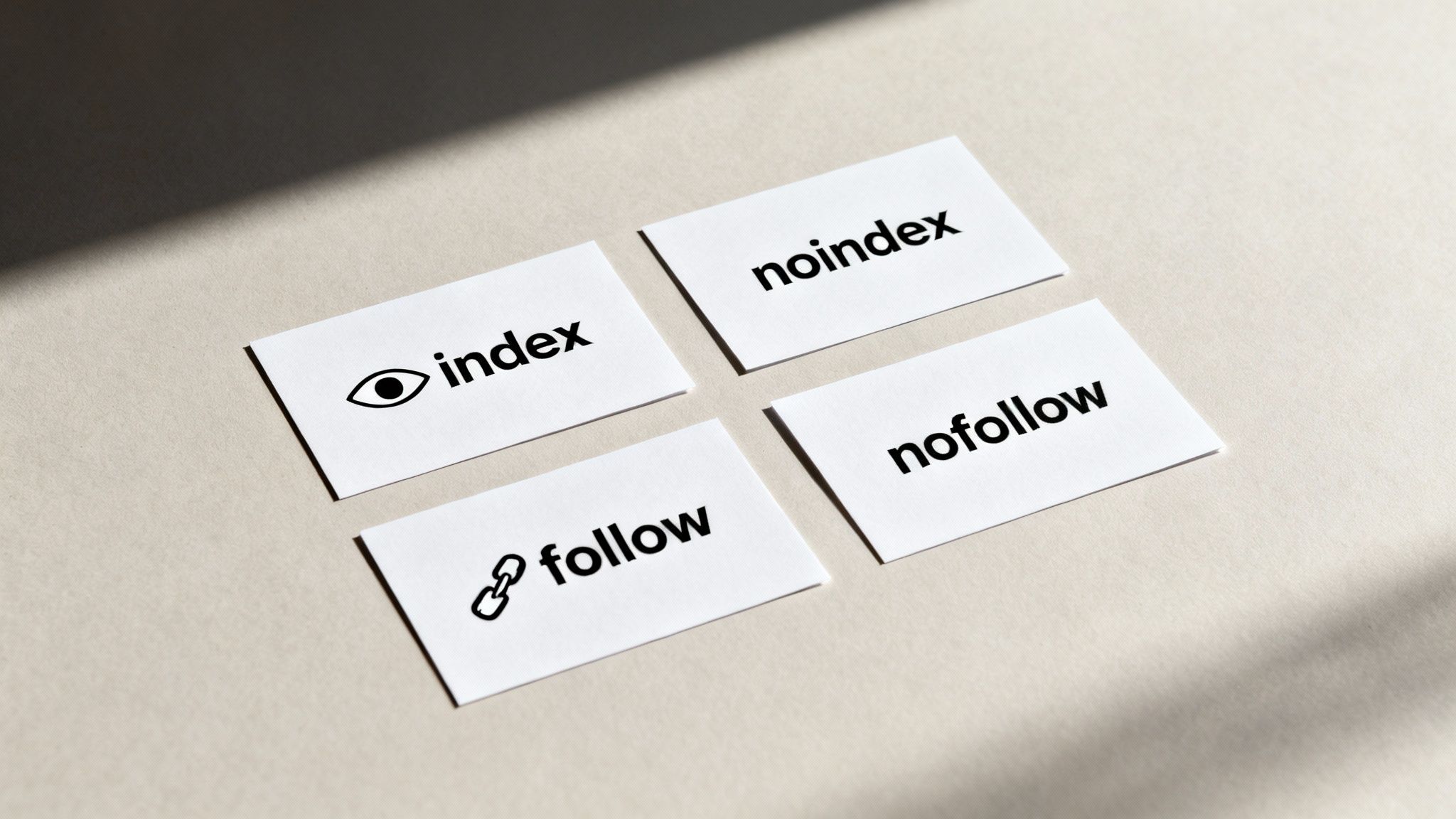
At the heart of robots meta tags are four simple commands. Think of them as on/off switches that control two key actions: whether a page should appear in search results, and whether the links on that page should be followed.
Understanding these four directives is the first step to gaining real control over your website's visibility. Let's demystify each one.
The Indexing Directives: index and noindex
These two instructions are opposites, and they are the most powerful commands in your SEO toolkit. They tell Google whether a page is allowed to be shown in its search results.
index: This is the default. It's like an open invitation telling search engines, "Please add this page to your search results." If you don't add any robots tag, search engines assume you meanindex.noindex: This is a direct order. It tells search engines, "You can visit this page, but do not show it in public search results." It’s the digital equivalent of a "Staff Only" sign.
One of the most practical combinations is noindex, follow. This tells Google to hide the page but still follow its links to find other important content. For a deep dive, you can learn more about how to strategically use noindex tags.
When To Use noindex
The noindex tag is a lifesaver in programmatic SEO. When you automatically generate thousands of pages, some will inevitably be thin on content or not meant for public viewing. That’s where noindex is your best friend.
It's perfect for:
- Thin Content Pages: Programmatically generated pages that don't yet have enough unique value.
- Internal Search Results: The pages created when a user searches on your own site.
- Thank You Pages: Simple confirmation pages a user sees after signing up or buying something.
- Staging Environments: Test versions of your site before they go live.
To fully understand how to keep pages out of the index, it's worth exploring related controls like the noindex directive within robots.txt, as this helps clarify how different rules can interact.
The Link-Following Directives: follow and nofollow
Next are the commands that tell search engines how to handle the links on a page. These instructions control the flow of authority (often called "link equity") from one page to another.
follow: This is the default. It tells crawlers, "Go ahead, follow the links on this page to discover other content."nofollow: This directive instructs crawlers, "Don't follow any of the links on this page or pass any authority through them."
Google now treats nofollow more as a strong hint than a strict rule, but it's still a vital tool for signaling the nature of your links. This is especially useful for user-generated content like blog comments, where you don’t want to vouch for potentially spammy websites.
By mixing and matching these simple directives, you create specific instructions. For example,
<meta name="robots" content="noindex, follow">tells Google: "Hide this page from search results, but feel free to follow its links to find other useful pages on my site."
Mastering these basic commands gives you the power to shape your site's presence in search results with precision.
Meta Robots Tag vs. X-Robots-Tag
When giving instructions to search engines, it comes down to one simple question: what type of file are you dealing with? Both the meta robots tag and the X-Robots-Tag can give the exact same commands, like noindex or nofollow. The only difference is where and how they are implemented.
Think of a meta robots tag as a note written on the first page inside a book. You have to open the book (the HTML page) to read it. This is perfect for web pages because they are built with HTML and have a <head> section where these notes belong.
The X-Robots-Tag, on the other hand, is like a bright sticky note attached to the outside of a file folder. You see the instruction before you even open the file. This is essential for files that don't have an HTML <head> section, like a PDF document, an image, or a video.
Where to Use Each Tag
The choice is simple and depends entirely on the file type. You use one or the other, never both for the same URL.
Meta Robots Tag: This is your go-to for any standard HTML web page. You place it directly in the page’s code, making it easy to implement through your website platform or by editing the HTML.
X-Robots-Tag: This is for all non-HTML files. Since files like PDFs, Word documents, or images don't have an HTML
<head>, you can't put a meta tag inside them. The instruction must be sent through the server's HTTP header instead.
The main takeaway is this: If it’s a web page, use a meta robots tag. If it’s a file like a PDF or an image, you must use the X-Robots-Tag.
Practical Implementation Examples
Seeing how each is used makes it easy to understand.
Example of a Meta Robots Tag
This code snippet goes inside the <head> section of your HTML page. It tells all search engines not to index the page but to follow the links on it.
<meta name="robots" content="noindex, follow">
Example of an X-Robots-Tag
This isn't added to a file; it's configured on your server. For an Apache server, you might add this to your .htaccess file to stop search engines from indexing all PDF files on your site.
<Files ~ "\.pdf$">
Header set X-Robots-Tag "noindex, follow"
</Files>
This rule acts like that sticky note on every single PDF, telling crawlers how to handle them. For a much deeper dive, our guide on technical meta tags covers more detailed examples.
Choosing Between Meta Robots and X-Robots-Tag
To make the decision even easier, here’s a quick comparison table to help you pick the right option every time.
| Criterion | Meta Robots Tag | X-Robots-Tag Header |
|---|---|---|
| Best For | Standard HTML web pages. | Non-HTML files (PDFs, images, videos). |
| Implementation | Placed in the <head> of the HTML file. |
Configured at the server level (e.g., .htaccess). |
| Flexibility | Page-specific and easy to change for one URL. | Can apply rules to entire file types or directories. |
| Common Use Case | Noindexing a thin content page or staging URL. | Noindexing a library of downloadable PDF guides. |
This table should clear up any confusion. You're simply choosing the right delivery method for your instructions based on the type of content.
How to Automate Robots Meta Tags for PSEO
Handling robots meta tags for a few pages is easy. But when you're running a programmatic SEO campaign with thousands of pages, doing it manually is impossible. This is where automation becomes your secret weapon, turning a massive headache into a smart, rule-based system that works for you.
The key is to stop thinking page-by-page and start creating rules. Instead of manually adding a noindex tag to one thin page, you build a system that does it automatically for any page that meets your definition of "thin." This is more accessible than it sounds and doesn't require deep coding knowledge.
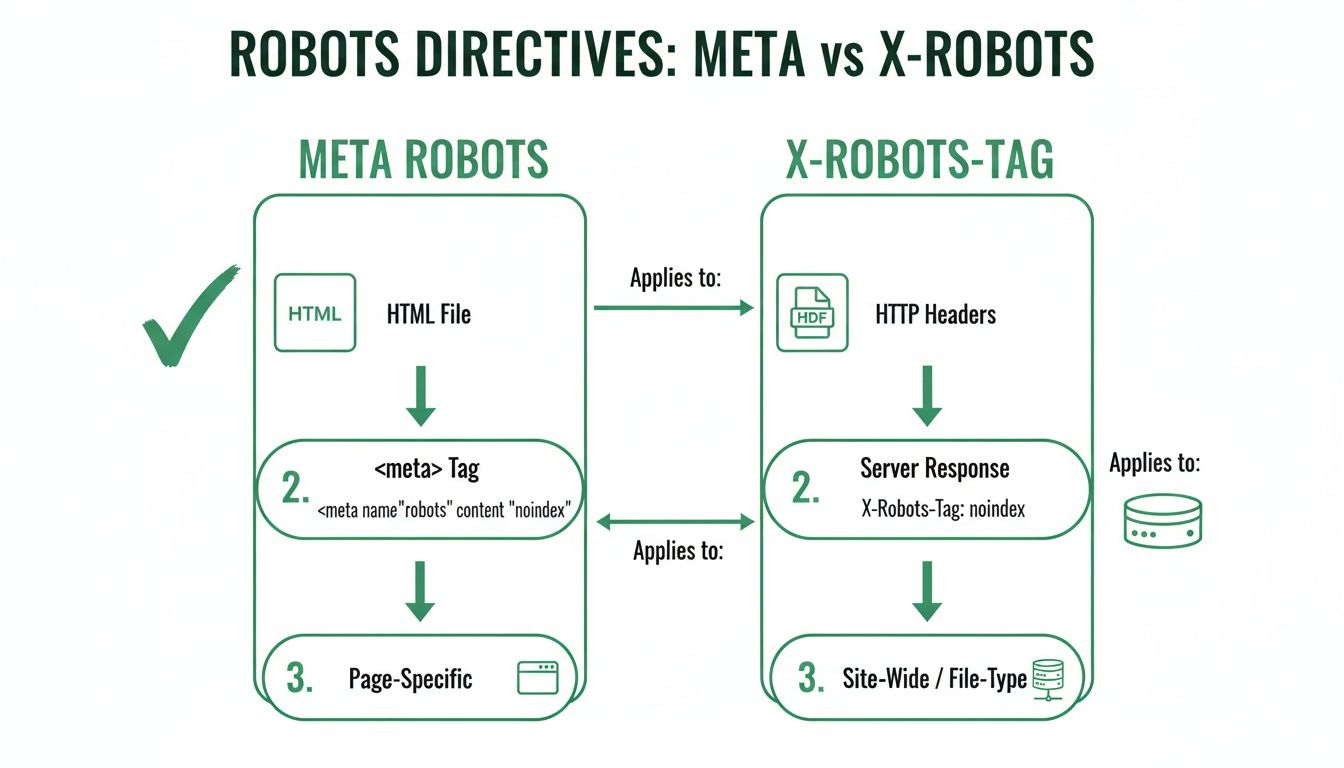
This chart shows that meta tags go inside your HTML, while X-Robots-Tags are sent for other files like PDFs. Your automation rules need to know this distinction to work correctly.
Step 1: Programmatic SEO with AI—The Simple Way
Programmatic SEO with AI sounds complex, but it's really about three practical steps:
- Get Your Data: First, you need data. This could be a list of products, locations, or services. You can get this data from a simple spreadsheet (like Google Sheets) or a more advanced database. This is your raw material.
- Use AI to Enrich the Data: This is where AI makes your life easier. You can use tools like ChatGPT or specialized AI writing platforms. Give the AI a row from your spreadsheet (e.g., "blue running shoes, size 10") and a simple prompt like: "Write a short, friendly product description for these shoes." The AI will generate unique content for each item, turning your basic data into rich text.
- Build Your Pages: Finally, you use a page template to automatically create a unique page for each row of your enriched data. Many website builders (like Webflow or WordPress with certain plugins) can connect directly to a Google Sheet and generate these pages for you, no coding required.
Step 2: Set "If-Then" Rules for Your Robots Tags
Once your pages are being created, you need to control their quality. This is where you use simple "if-then" logic in your page template.
Think of it like setting rules in an email filter. For example, you can create a rule to automatically add a noindex, follow tag if a page has fewer than 300 words. This keeps your low-value "stub" pages out of Google's index but still lets crawlers find links to your better content.
Here are a few more practical examples:
- Content Freshness: Automatically apply a
noindextag to all pages less than a week old. This gives them time to be fully built out before search engines see them. - Data Completeness: If a product page is missing key information like a price or an image, a rule can automatically
noindexit until the data is complete. - AI-Generated Content Quality: If your AI-generated text is too short or fails a quality check, you can
noindexthe page until it's improved.
For a great deep dive into setting up this kind of system, our guide on building a PSEO data pipeline is the perfect place to start.
By setting these rules once at the template level, you ensure that every single page—whether you have 100 or 100,000—gets the right instructions without you lifting a finger. That's what scalable SEO is all about.
Future-Proofing with Automation
Automation isn't just about old-school SEO. With the rise of AI, new challenges have emerged, like companies scraping your content to train their AI models. A smart programmatic strategy can protect your content at scale.
You can set up a rule to automatically add directives like noai or noimageai to all your pages. This tells AI crawlers not to use your text or images for training purposes, protecting the unique value you've built. Setting this rule once ensures your entire site doesn't just become free training data for big tech. It’s about using simple automation to preserve your site's long-term value.
Avoiding Common Implementation Mistakes
Even simple tools can cause big problems if used incorrectly. With robots meta tags, one small mistake can make your most important pages disappear from Google. Let's walk through the most common pitfalls and how to avoid them in a simple, non-technical way.
The Conflicting Signal Mistake
This is the most common trap. It happens when you block a URL in your robots.txt file and also add a noindex tag to that same page.
Think of it this way: your robots.txt file is a bouncer at the front door. If you tell the bouncer not to let Google in, it can never get inside to read the "Do Not List This Page" (noindex) sign you put on the wall. As a result, if the page was already in Google's index, it will stay there because the crawler can't get back in to see the new instruction.
The Fix: To reliably remove a page from search results, you must allow crawling in
robots.txt. This lets Googlebot visit the page, read thenoindexinstruction, and then remove it from the index. Usenoindexto control what gets indexed androbots.txtto control what gets crawled—but rarely both for the same URL.
The Syntax Slip-Up
Search engine crawlers are very literal. They follow instructions perfectly, but only if they're written correctly. A simple typo in your meta tag can make it completely useless.
Common mistakes include:
- Using a semicolon instead of a comma:
<meta name="robots" content="noindex; follow"> - Misspelling the instructions:
<meta name="robots" content="noindx, follow"> - Placing the tag outside the
<head>section of your HTML.
If you make one of these mistakes, the crawler will ignore it and just do what it normally does: index and follow the page—the exact opposite of what you wanted.
The Accidental Mass De-indexing
This is the nightmare scenario for any programmatic SEO project. It usually happens when a global template or a site-wide setting is changed incorrectly. For example, a developer might add a noindex tag to a test site and then accidentally push that change to the live site.
Suddenly, every page using that template gets the noindex tag, and your entire site starts vanishing from search results. The best way to prevent this is to be careful and test changes on a small batch of non-critical pages first. Check them in Google Search Console, and only then apply the change to your whole site. Proper use of noindex ensures your brand's reputation is built on stable, high-quality pages. You can find more on digital trends in DataReportal's analysis of Germany's digital landscape.
How to Test and Audit Your Robots Tags
Setting your robots meta tags is only half the battle. If search engines can't read your instructions correctly, they're useless. A tiny mistake in a programmatic setup can affect thousands of pages, so regular checks are essential.
Think of it like sending an important email. You don't just hit "send" and hope for the best; you check your "sent" folder to make sure it went through. Auditing your tags is how you confirm that search engines received and understood your instructions.
Your Practical Audit Checklist
Auditing a large, programmatically generated site doesn't have to be complicated. With the right tools and a simple process, you can quickly find errors before they cause problems.
Here’s a simple process you can follow:
Crawl Your Site: Use a tool like Screaming Frog (it has a free version) to crawl your website. This will give you a complete list of all the meta robots instructions on all your pages.
Filter and Verify: Once the crawl is done, filter the results to show only pages with a
noindexdirective. This gives you a clear list of all the content you've intentionally told search engines to hide.Cross-Reference with Analytics: Now for the most important step. Take that list of
noindexpages and compare it to your website analytics. Are any of the pages on this list getting traffic from Google search? If so, you've found a mistake where a valuable page is being accidentally blocked.
This cross-referencing step is your safety net. It helps you catch mistakes where a rule was applied too broadly, so you can rescue important pages that were accidentally hidden from search.
Using Google's Tools for a Final Check
After your own crawl, it's always smart to see your pages the way Google does. This is where Google Search Console is your best friend.
The URL Inspection tool gives you a direct report from Google. Just enter any URL from your site, and it will tell you exactly which robots meta tags Google found the last time it visited. This is the ultimate way to confirm your instructions were received correctly.
To get the most out of this feature, check out our detailed guide on navigating Google Search Console for pSEO. And for a broader look at keeping your site healthy, take a look at your ultimate guide to performing a technical SEO audit. This methodical approach will give you the confidence to find and fix errors quickly.
Frequently Asked Questions
Even with the basics covered, a few questions about robots meta tags come up often. Let’s clear up any remaining confusion so you can use these commands with confidence.
Can I Use Multiple Robots Meta Tags on One Page?
No, you should only use one robots meta tag per page. If you include multiple tags, you risk confusing search engines, which can lead to unpredictable results.
To keep your instructions clear, combine everything into a single <meta> tag in your HTML <head>. For example, instead of two separate tags, combine them like this: <meta name="robots" content="noindex, nofollow">. This ensures your instructions are understood exactly as intended.
What Is the Difference Between Noindex and Robots.txt Disallow?
This is a common point of confusion. The easiest way to remember it is: robots.txt disallow is like putting a "Do Not Enter" sign on a door. It stops crawlers from ever visiting the page.
A noindex tag lets the crawler come inside and look around, but then tells it, "Don't list this place in your public directory." The page is visited, but it won't be shown in search results.
If your goal is to remove a page from Google's index, you must use the
noindextag and make sure the page is not blocked in yourrobots.txtfile. If you block the crawler, it will never see yournoindexinstruction.
How Long Does It Take for Google to See a Changed Robots Tag?
This depends on how often Google visits your site. For a large, frequently updated website, a change might be noticed within a day or two. For smaller or newer sites, it could take days or even weeks.
If you need to speed things up, you can ask Google to recrawl a page using the URL Inspection tool in Google Search Console. Just remember, this is only a request. Google ultimately decides when to recrawl, so a bit of patience is always needed.
Ready to scale your content strategy with precision and confidence? The Programmatic SEO Hub offers the guides, templates, and tools you need to master everything from robots meta tags to full-scale automation. Future-proof your SEO at https://programmatic-seo-hub.com/en.
Related Articles
Mobile friendly test google: A Practical Guide to Master Mobile SEO
Even though Google’s standalone Mobile-Friendly Test tool is a thing of the past, the principle behind it is more critical than ever. The simple truth is that Google now overwhelmingly uses its...
A Practical Guide to Competitive Analysis Keywords
When we talk about competitive analysis keywords, we're really talking about the search terms that are already making money for your rivals. By digging into these, you uncover their entire...
Landing Pages SEO A Practical Guide to Rank and Convert
When we talk about SEO for landing pages, we're not just talking about general website optimisation. We're getting hyper-specific. This is the art of building and refining standalone pages...