Landing Pages SEO A Practical Guide to Rank and Convert
When we talk about SEO for landing pages, we're not just talking about general website optimisation. We're getting hyper-specific. This is the art of building and refining standalone pages designed to rank for very particular keywords, creating a direct bridge between what someone types into Google and the exact solution you offer.
It’s a powerful strategy because it focuses entirely on converting a single, focused action, making it one of the best ways to capture visitors who already know what they want. Essentially, you're turning search engine users into potential customers from the moment they arrive.
Why Landing Page SEO Is Your Biggest Untapped Growth Lever

Most businesses pour their resources into optimising their homepage and blog. That's fine, but it’s a broad-net approach that often misses people with specific, urgent problems. This is exactly where a dedicated focus on landing pages becomes a complete game-changer. The goal isn't just to rank higher; it’s about ranking for the right queries and presenting a perfect-fit solution instantly.
Here’s a simple way to think about it: general SEO is like a big department store with something for everyone. Landing page SEO, on the other hand, is the specialist boutique that stocks the one precise item a person is actively searching for. It’s all about matching a precise user intent with a perfectly tailored answer.
Before we get into the weeds, it's worth getting clear on what a landing page is at its core. Unlike a blog post that educates, a landing page is built from the ground up to convert.
The Shift from Generic Traffic to High-Value Conversions
The real magic here is attracting high-value traffic. Instead of chasing a broad term like "CRM software," you can create laser-focused pages for "CRM for small construction companies" or "real estate CRM with lead tracking." Sure, these long-tail keywords have lower search volume, but their conversion rates are massively higher because they solve a user's exact problem.
This targeted strategy has a huge impact on search performance. In the real world, landing pages are your ticket to capturing the 70% of non-branded searches that most people perform. Engagement is everything, and pages that hold top rankings are almost always the ones with longer view times and lower bounce rates.
The goal isn't just to be visible. It's to be the most relevant answer for a very specific question, turning a search engine query into a direct business opportunity.
Scaling Your Efforts with Programmatic SEO
Okay, so creating hundreds of these unique pages by hand sounds like a nightmare. That's where programmatic SEO enters the picture. Think of it as a smart system for creating lots of targeted landing pages automatically. Instead of writing each one manually, you use a template and a list of data (like cities or industries) to generate unique pages at scale.
This lets you target an almost endless list of specific search queries without hiring a huge team. For a deeper look, you can explore how to create different landing page variants to match user intent precisely. This approach transforms a manual, time-consuming task into a scalable growth engine, paving the way for sustainable organic success.
Laying the Foundation: Mapping User Intent to Page Structure
 Before you even think about writing a headline, you have to get inside your potential customer's head. This is the absolute cornerstone of effective landing pages seo—figuring out what someone really wants when they type something into Google.
This whole process, which we call mapping user intent, is what separates a landing page that converts from one that just sits there.
It’s less about fancy tools and more about being a detective. Your best tool is Google itself. Just search for your target keywords and look at what’s already ranking on page one. Google is literally showing you what it thinks the best answer is for that search.
This isn’t just theory; it's a practical way to build pages that have a clear purpose from the get-go.
Decoding the Four Main Types of User Intent
User intent typically boils down to one of four categories. Knowing which one you're targeting tells you exactly what kind of page to build.
- Informational Intent: The user is hunting for information. Think "how-to" guides, definitions, or simple explanations. Their only goal is to learn something.
- Navigational Intent: The user already knows where they want to go. They’re just typing "YouTube" into Google instead of the address bar. You generally don't target these keywords for landing pages unless you are that brand.
- Transactional Intent: The user has their wallet out and is ready to buy. You'll see keywords with words like "buy," "price," or "discount." This is prime territory for a sales-focused landing page.
- Commercial Investigation: This is that crucial middle ground. The user plans to buy, but they're still weighing their options. Keywords like "best," "review," "comparison," or "alternative" are dead giveaways.
So, a search for “how to implement a crm” is clearly informational. That person wants a guide or a checklist. But a search for “best crm for small business” signals commercial investigation. This user is much closer to a decision and needs a comparison page or a features breakdown to push them over the edge.
Creating a Repeatable Intent Mapping Process
Building one great landing page is one thing, but scaling that success requires a system. You need a repeatable process for grouping related keywords (keyword clusters) and mapping them to a logical page structure.
For anyone just starting out, our guide on search intent mapping goes way deeper into this foundational strategy. It's worth a read.
This process ensures every single page you create has a clear, strategic purpose that’s tied directly to a real user’s needs.
By aligning your page structure with user intent, you're not just optimising for search engines; you're optimising for human behaviour. That alignment is what drives both rankings and conversions.
Using AI to Accelerate Your Research
Let's be honest, manually sifting through hundreds of keywords is a soul-crushing task. This is where AI can become your best assistant, helping you scale your research without getting lost in the weeds.
Imagine you have a giant list of keywords for your product. Instead of going through them one-by-one, you can use a simple prompt in a tool like ChatGPT to do the heavy lifting.
Practical AI Prompt for Sorting Keywords by Intent
I have a list of keywords for my CRM software. Please categorize each one as Informational, Commercial, or Transactional, and explain in one sentence why you chose that category.
Keywords:
- "crm software free trial"
- "what is a crm system"
- "compare crm platforms"
- "hubspot vs salesforce"
- "how to set up a crm for sales"
A simple prompt like this can save you hours. It lets you quickly sort your keywords into neat piles, with each pile representing a specific type of landing page you need to build. This makes programmatic SEO feel achievable, even for a tiny team, because you can automate the boring research and focus on creating great content.
Crafting On-Page Content That Ranks and Converts
Once you’ve got your intent mapping sorted, the real work begins: creating content that both search engines and actual people will appreciate. This isn't about clumsily stuffing keywords onto a page. It's about crafting a clear, persuasive message that directly answers a user's question and guides them toward taking action.
Great on-page SEO strikes a tricky balance. You need enough depth to establish authority in Google's eyes, but your copy has to stay concise and compelling enough to actually convert a visitor. For landing pages seo, getting this balance right is everything.
Hooking Visitors Above The Fold
You’ve got just a few seconds to make a first impression. The content "above the fold"—everything a user sees without having to scroll—is your most critical real estate. This is where you need a killer headline and an introduction that instantly tells visitors they're in the right place.
Your H1 headline must be crystal clear and weave in your primary keyword naturally. Forget clever wordplay; focus on direct value. If your page targets "inventory management for e-commerce," a headline like "Effortless Inventory Management for Your E-commerce Store" is far more effective than something vague.
Follow that up immediately with a short, punchy paragraph that summarises the core benefit. This simple one-two punch is incredibly effective at reducing bounce rates because it validates the user’s original search intent right away.
Structuring Content for Scannability
Let's be honest: nobody reads web pages word-for-word. We all scan. That means structuring your content for easy scanning isn't just a nice-to-have; it's non-negotiable if you want your message to stick.
Break up your text with descriptive subheadings (H2s and H3s). Think of them as signposts that help users jump to the sections that matter most to them. Then, use simple formatting to make key information pop.
- Bold Text: Use it for important terms, stats, or benefits that need to stand out.
- Bullet Points: Ideal for listing features or steps. They’re infinitely easier to digest than a block of text.
- Short Paragraphs: Stick to two or three sentences max. This creates welcome white space and makes the page feel less intimidating.
This approach doesn't just improve the user experience. It also helps search engines understand the hierarchy and structure of your content, which is a subtle but important ranking factor.
Integrating Keywords Naturally
Modern search engines are smart. They understand context, synonyms, and intent, so there's zero need to awkwardly repeat keywords. The goal is to integrate your primary and semantic keywords in a way that sounds completely human.
Semantic keywords are simply related terms and phrases. For a page on "CRM for small business," you'd naturally talk about "lead tracking," "customer relationships," "sales pipeline," and "contact management." Sprinkling these terms throughout your content gives Google a much richer understanding of what your page is about. You might also find our guide on how to find and use long-tail keywords effectively useful.
The key is to write for the user first. When your content genuinely answers their questions and addresses their pain points, the keywords will naturally fall into place.
Getting this right has huge implications. The first organic spot commands a 34% click-through rate (CTR) on desktop, and the top three positions capture over 75% of all clicks. That’s why solid on-page optimisation is an absolute must for driving meaningful traffic. You can dig into more stats over at Incremys.com.
Your On-Page Optimisation Checklist
To make sure you’ve covered all the essentials, here’s a quick checklist to run through for every landing page you build. Think of it as basic hygiene for good landing pages seo.
On-Page Element Optimisation Checklist
| On-Page Element | Primary SEO Purpose | Key Conversion Tactic | Implementation Tip |
|---|---|---|---|
| Title Tag | Tells search engines the page's main topic. | The first thing users see in search results; must be compelling. | Keep it under 60 characters and include the primary keyword near the beginning. |
| Meta Description | A 160-character ad for your page in the SERPs. | Persuade users to click your link over a competitor's. | Write an active, benefit-driven summary. Don't just list keywords. |
| Image Alt Text | Provides context for images to search engines. | Improves accessibility for visually impaired users. | Describe the image accurately, including keywords where relevant. |
| Internal Links | Spreads link equity and helps Google crawl your site. | Guides users to other relevant content on your site. | Link to related blog posts or deeper-level feature pages using descriptive anchor text. |
By systematically applying these principles, you create landing pages that are not only primed to rank but are also structured to turn visitors into customers. This is how you transform SEO from a simple traffic-driving game into a powerful engine for business growth.
Nailing the Technical SEO for Flawless Landing Page Performance
Technical SEO can sound like a dark art, but it’s really just about making sure search engines can find, understand, and ultimately rank your landing pages without hitting any walls. Think of it as ensuring the doors to your digital shop are unlocked so customers—and Google—can easily walk in.
You can craft the most persuasive copy on the planet, but if Google can't crawl your page properly, it's basically invisible. Getting these foundational elements right is non-negotiable for landing pages seo.
Making Sure Your Pages Are Discoverable and Indexable
First things first: are your landing pages even "indexable"? This is a simple permission slip you give to search engines, allowing them to add your pages to their enormous library. If a page isn't indexed, it will never show up in search results, no matter how perfectly you’ve optimised everything else.
The quickest way to check is with Google Search Console's URL Inspection tool. Just pop your landing page URL in, and it'll tell you straight away if the page is on Google. If it’s not, the culprit is often a simple setting, like a "noindex" tag accidentally telling Google to ignore the page.
Taming Duplicate Content with Canonical Tags
As you build out more and more landing pages—especially if you're using a programmatic approach—you'll inevitably create pages that look very similar. Search engines get confused by this duplicate content; they don't know which version to show in the results. This is where the canonical tag becomes your best friend.
A canonical tag is just a small piece of code that tells search engines, "Hey, of all these similar-looking pages, this one is the master copy."
For example, imagine you have pages for "CRM for small business in Berlin" and "CRM for small business in Munich" that share 90% of the same content. You’d place a canonical tag on the Munich page that points to the Berlin page, signalling that it’s the main version. This consolidates all your ranking power into one page and stops you from competing against yourself.
Optimising for Core Web Vitals
Google’s Core Web Vitals are a set of metrics that measure the real-world experience a user has on your page. In plain English, they check how fast your page loads, how quickly a user can interact with it, and whether the layout is stable.
- Largest Contentful Paint (LCP): How long does it take for the main block of content to load? Aim for under 2.5 seconds.
- First Input Delay (FID): How fast does the page respond when a user clicks a button or link? You want this under 100 milliseconds.
- Cumulative Layout Shift (CLS): Does the content jump around while loading? This is super annoying for users, so keep it to a minimum.
A slow page doesn’t just frustrate people; it actively harms your rankings. Google knows users will bounce from a slow site, so it naturally prioritises pages that deliver a quick, smooth experience.
Improving these vitals often comes down to basics like compressing images before you upload them or using a good caching system. You can get a much deeper look into checking and improving your site’s health in our detailed guide on Core Web Vitals.
Using Free Tools to Check Your Performance
You don't need to be a developer to get a handle on your landing page's technical health. There are some fantastic free tools that do the heavy lifting.
- Google PageSpeed Insights: This should be your first stop. Enter your URL, and it will spit out a detailed report on your Core Web Vitals for both mobile and desktop, complete with specific, actionable recommendations.
- Google's Mobile-Friendly Test: A simple but crucial check. It tells you instantly if your page is easy to use on a mobile device—a massive ranking factor.
The SEO software market is projected to hit USD 9.8 billion by 2030, a clear sign of how vital these technical details are for scaling success. In fact, data consistently shows that top-tier landing pages with conversions over 10% almost always have excellent Core Web Vitals. On the flip side, pages with poor technical performance often see no engagement at all. The Grand View Research report on the SEO software market in Germany has more details on this trend. By focusing on these practical fixes, you’re giving your landing pages the best possible chance to perform.
Implementing Programmatic SEO with AI: A Practical Guide
Trying to scale your landing pages from a handful to hundreds, or even thousands, can feel completely overwhelming. This is exactly where programmatic SEO, powered by AI, stops being a buzzword and becomes your most valuable growth lever. It's a system for creating hyper-targeted pages at scale, and it doesn't need to be nearly as technical as it sounds.
The core idea is simple: you combine a data source (like a spreadsheet) with a page template to automatically generate unique pages. Think of it like a mail merge, but instead of letters, you're building fully optimized web pages. This lets a solo founder do the work of a huge content team.
Step 1: Build Your Data Foundation in a Spreadsheet
Forget complex databases. A simple Google Sheet is all you need to start. This spreadsheet is the engine for your page creation.
Create columns for your main topic (the "head term") and the variations (the "modifiers").
- Head Term: The core product or service. Example: "Project Management Tool".
- Modifiers: Variables like locations, industries, or use cases. Examples: "for construction" or "in Hamburg".
Your spreadsheet would look like this:
| Head Term | Modifier 1 (Industry) | Modifier 2 (Location) |
|---|---|---|
| Project Management Tool | for construction | in Hamburg |
| Project Management Tool | for marketing agencies | in Munich |
| Project Management Tool | for startups | in Frankfurt |
Each row in this sheet becomes a unique landing page, like "Project Management Tool for startups in Frankfurt".
Step 2: Design a Flexible Page Template
Next, create a single page design in your website builder (like WordPress or Webflow). This is your template. It will have static parts that don't change (like your logo and footer) and dynamic "placeholders" that will be filled with data from your spreadsheet.
For example, your page title (H1) in the template might look like this: {{Head Term}} {{Modifier 1}} {{Modifier 2}}.
When the system builds the page for the first row of your spreadsheet, it automatically becomes: "Project Management Tool for construction in Hamburg." Every page gets a unique, keyword-optimized title.
Step 3: Use AI to Write Unique Content for Each Page
This is the most crucial step. If you only swap out keywords, you'll create low-quality pages that Google ignores. To avoid this, use AI to write unique content for key sections of each page.
Instead of one generic introduction, use an AI tool like ChatGPT to create a unique intro for each row in your spreadsheet.
Practical AI Prompt for a Unique Introduction:
Act as a helpful marketing expert. Write a short, 100-word introduction for a landing page about our "{{Head Term}}". The page is for people in the {{Modifier 1}} industry. Focus on the specific problems they face and how our tool solves them.
You can run this prompt for every row in your spreadsheet to get hundreds of unique, context-aware introductions. Do the same for other sections:
- FAQs: Generate 3 unique questions relevant to that specific industry or location.
- Benefits: Rewrite benefits to speak directly to that audience.
- Call-to-Action: Write a closing paragraph that encourages that specific user to act.
This diagram gives a high-level view of the technical pillars that hold up any successful landing page strategy.
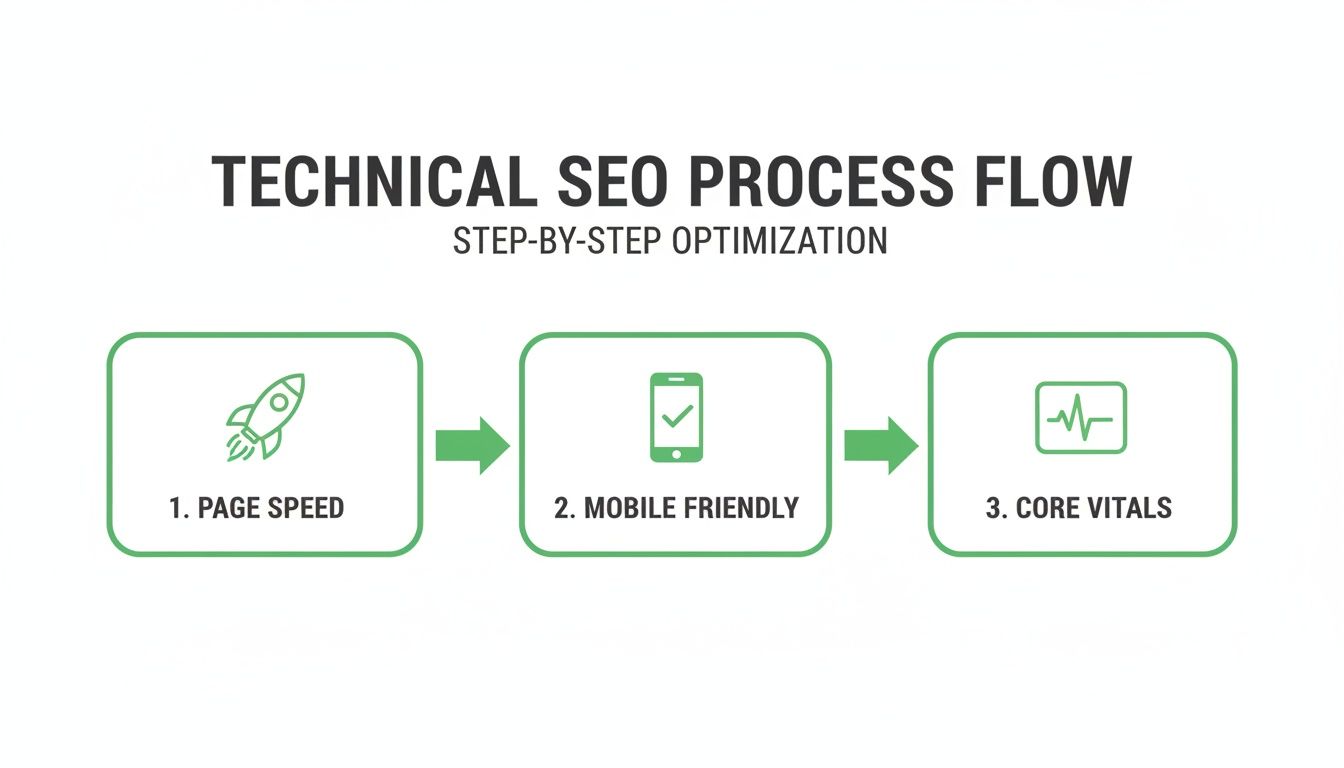
Each of these elements—from page speed to mobile-friendliness—is a non-negotiable piece that ensures your AI-generated content can actually perform in the wild.
A Simple No-Code Workflow Example
You don't need to be a developer to pull this off. Here's how you can connect everything using simple tools:
- Database: Use Google Sheets to manage your data.
- Automation: Use a tool like Zapier or Make.com. This will be the "glue" that connects your tools.
- Content Generation: Set up a Zapier automation. For every new row in Google Sheets, it sends the data to OpenAI (ChatGPT) with your pre-written prompts. The AI then writes the unique content. You can get a deeper understanding of this by reading about natural language generation.
- Publishing: Zapier then sends the finished content to your website builder (Webflow or WordPress), which automatically creates and publishes a new page using your template.
By combining a simple data source, a flexible template, and AI-powered content generation, you create a scalable system that produces truly valuable and unique landing pages, avoiding the pitfalls of old-school automated content.
This systematic process is how you truly master landing pages at scale. To really get a handle on the potential of generating thousands of optimised pages, it's worth digging into effective programmatic SEO tactics. It breaks the process down and makes large-scale content creation something anyone can achieve.
Common Landing Page SEO Questions, Answered
Once you start moving from theory to actually building SEO landing pages, the real questions pop up. It's one thing to read about a strategy, but another to implement it. Let's tackle some of the most frequent questions I hear to get you moving forward with confidence.
How Many Landing Pages Are Too Many for SEO?
This is a classic "how long is a piece of string?" question. There's no magic number. It's never about quantity for quantity's sake; it's about quality and serving a specific user intent.
Honestly, a well-executed programmatic strategy with 1,000 unique, valuable pages targeting super-specific long-tail searches is infinitely more powerful than 10 generic, poorly optimised pages. The real test is whether each page serves a distinct purpose. As long as every page provides a unique answer to a specific problem, you're not creating duplicate content—you're capturing the long tail. Just be smart with your canonical tags to signal the "master" version when content gets similar, and make sure your site structure can actually handle the scale without confusing Google.
Can I Use the Same Template for All My Programmatic Landing Pages?
Yes, absolutely. In fact, using a template is the entire point of doing programmatic SEO. The trick, though, is to design a template that's flexible enough to allow for major variations where it counts.
Your layout—the header, footer, maybe a sidebar—can stay the same. But the money-making elements must be unique to each generated page. I'm talking about:
- The main headline (your H1)
- The opening paragraph
- The core body content itself
- Any specific Frequently Asked Questions (FAQs)
These sections have to be dynamically populated and genuinely unique to the page's target keyword. That's what gives the page real value and keeps you out of Google's bad books for thin or duplicated content.
How Do I Measure the Success of My Landing Page SEO Efforts?
Success is about results, not just traffic. You need a mix of SEO and business metrics to see the complete picture.
Of course, start with the basics in Google Search Console. Track organic traffic, keyword rankings for your main terms, and total impressions. But that's just the start. You have to look at what people do once they arrive.
The goal isn't just to attract eyeballs; it's to turn that traffic into qualified leads or sales. Your metrics should always tie back to a business objective.
Dive into on-page engagement signals. Look at bounce rate, average time on page, and the single most important metric of all: the conversion rate for each individual landing page. That's where you see the real ROI.
Should My SEO Landing Pages Be in My Main Website Navigation?
It really depends on the page’s job. If you've built a landing page targeting a core service or product—something central to what you do—then it absolutely can and probably should be in your main navigation. That makes it easy for any visitor to find.
However, for those hyper-specific, long-tail programmatic pages (think "CRM for plumbers in Hamburg"), it's better to keep them out of the main menu. Imagine cluttering your navigation with hundreds of those links; it would be a user experience nightmare. Instead, these pages should be found through internal links from relevant blog posts, from parent category pages, or maybe a "Resources" section. The absolute priority is making sure every single one is listed in your XML sitemap so that search engines can find and crawl them efficiently.
Ready to build and scale your own high-performing landing pages? The Programmatic SEO Hub provides the playbooks, templates, and free tools you need to master intent-led content at scale. Start learning for free.
Related Articles
Mobile friendly test google: A Practical Guide to Master Mobile SEO
Even though Google’s standalone Mobile-Friendly Test tool is a thing of the past, the principle behind it is more critical than ever. The simple truth is that Google now overwhelmingly uses its...
A Practical Guide to Competitive Analysis Keywords
When we talk about competitive analysis keywords, we're really talking about the search terms that are already making money for your rivals. By digging into these, you uncover their entire...

A Modern Guide to AI-Powered SEO Content Marketing
At its heart, SEO content marketing is all about becoming the best, most helpful answer to the questions your ideal customers are typing into Google. It's the art of creating and sharing...