A Practical Guide to Mastering SEO on Shopify
Before you can even start thinking about keywords, content, or driving traffic, you need to get the technical foundation of your Shopify store right. This is non-negotiable.
Think of it as paving the driveway before you build the house. A solid technical setup ensures Google can find, crawl, and understand your store from day one, preventing major headaches down the road.
Building Your Shopify SEO Foundation
Many store owners jump straight into writing product descriptions, completely skipping these first few crucial steps. Months later, they're left wondering why they have zero organic traffic. Don't make that mistake.
Getting this foundation right isn’t about complex coding. It’s about checking a few critical boxes inside Shopify and using Google's own free tools to open a direct line of communication with the search engine. Without this, even the most amazing content might as well be invisible.
Connect to Google Search Console
First things first: set up Google Search Console (GSC). This free tool is your command centre for everything related to your site's health and performance in Google Search. It’s where Google will alert you to indexing problems, crawling errors, and security issues.
Connecting your Shopify store is simple:
- Get a GSC Account: Head over to Google Search Console and sign in with your Google account.
- Add Your Store: You'll be asked to add a "property." Just enter your main Shopify domain (e.g.,
yourstore.com). - Verify You're the Owner: Google needs proof you own the site. The easiest way for Shopify users is the meta tag method. Google gives you a small code snippet—just copy it and paste it into the
<head>section of yourtheme.liquidfile. It's a quick copy-and-paste job.
Once you’re verified, you've established a direct link to Google. This is an absolute must for any serious ecommerce store.
Submit Your Sitemap
Now that you're connected, it's time to give Google a map of your store. A sitemap is basically a list of all the important pages on your site—products, collections, blog posts, you name it. It helps Google discover all your content efficiently.
The good news? Shopify automatically generates and updates this for you. You just have to tell Google where it is.
Your sitemap is always found at yourstore.com/sitemap.xml.
Copy that URL, head to the "Sitemaps" report in your GSC account, paste it in, and hit "Submit." Google will then start using this file to crawl your site much more intelligently.
Key Takeaway: Submitting your sitemap is like giving a delivery driver a clear map with all the house numbers. It ensures nothing gets missed and every page has a chance to be found.
Understand Your Robots.txt File
Another file Shopify creates for you automatically is the robots.txt file, which lives at yourstore.com/robots.txt. This is a set of instructions for search engine bots, telling them which pages they shouldn't crawl.
For the vast majority of stores, Shopify's default robots.txt is perfectly fine. It blocks bots from crawling unimportant pages like the cart, checkout, and admin areas. You generally don’t need to touch this file.
However, knowing it exists is useful for troubleshooting. If you're an advanced user planning to scale with thousands of pages, you might want to dive deeper into these settings; exploring programmatic SEO fundamentals can offer great insights. For everyone else, just trust the default.
Crafting Product Pages That Convert and Rank
With your technical foundation sorted, it's time to dive into the pages that actually drive your sales—your product and collection pages. This is where the bulk of your on-page SEO on Shopify work really happens. Forget just stuffing keywords; this is about creating a message that speaks to both your customers and the search engine crawlers.
Think of every product page as your best salesperson. Its job is to anticipate questions, show off the benefits, and ultimately convince a visitor to buy. For Google, its job is to send clear signals about what the page offers so it can match it to the right person searching.
Finding the Right Keywords
Before you write a single word of copy, you need to get inside your customer's head. What terms are they actually typing into Google? Fancy industry jargon or clever brand names won't do you any good if no one is searching for them.
You don't need expensive tools to get started. Simple keyword research is surprisingly powerful.
- Google's Autocomplete: Start typing your product name into the search bar and see what suggestions appear. These are real, popular searches. If you sell "linen bedding," you might see "linen bedding for hot sleepers" or "eco-friendly linen bedding" pop up.
- "People Also Ask" Box: This section in the search results is a goldmine. It tells you the exact questions your potential customers have. Answering these directly in your product descriptions is a killer tactic.
- Competitor Analysis: Check out the product titles and descriptions of the top-ranking competitors for your target terms. What common phrases or features are they all highlighting? There's a reason they're at the top.
The goal here is to land on a primary keyword for each page (like "organic cotton baby onesie") and a handful of related secondary keywords (e.g., "soft newborn bodysuit," "GOTS-certified baby clothes").
Writing Titles and Descriptions That Get Clicks
Once you've got your keywords, it's time to put them to work in the most visible elements of a search result: the SEO title and meta description. You can edit these for any page by scrolling to the bottom of the editor in your Shopify admin and finding the "Search engine listing" section.
For SEO Titles:
This is your clickable, blue headline in Google. It has to be clear, concise, and compelling. A great formula that works time and again is:
Primary Keyword | Key Benefit | Your Brand Name
- Example: "Organic Cotton Baby Onesie | Ultra-Soft & Hypoallergenic | Willow Creek Kids"
For Meta Descriptions:
This is your 160-character sales pitch. While it doesn't directly impact rankings, a great one makes people want to click on your result over someone else's. Mention key features, a call-to-action, and what makes your product special.
- Example: "Keep your little one comfy in our GOTS-certified organic cotton onesie. Buttery-soft, breathable, and perfect for sensitive skin. Shop now for free shipping!"
The Power of Great Product Descriptions
Your on-page description is where you close the deal. Whatever you do, don't just copy and paste the generic text from your manufacturer. Write unique, engaging copy that addresses your customer's pain points and desires.
Weave your secondary keywords in naturally here. Break up long blocks of text with bullet points that highlight features and, more importantly, benefits. Tell a story. Who is this product for? What problem does it solve? This is also the perfect place to build internal links. Selling a camera? Link out to your "camera lenses" collection page or a helpful blog post on "beginner photography tips." Mastering this persuasive copy gets much easier when you have a solid framework, which is where learning about effective content templates can really help streamline the process.
Expert Tip: Don't neglect your image alt text! Describe your images accurately for visually impaired users and for Google. Instead of a file name like "IMG_1234.jpg," use "toddler-wearing-blue-organic-cotton-onesie.jpg." For the alt text itself, be descriptive: "Toddler smiling in a blue organic cotton baby onesie."
Optimising these on-page elements is crucial because organic search is still one of the top acquisition channels for e-commerce. For German Shopify merchants, where online shopping is deeply embedded in consumer behaviour, this is especially true. Industry data reveals that organic search drives around 43% of traffic to e-commerce sites, which contributes to an estimated 23–24% of all sales. By investing in properly localised SEO, German stores can capture a huge share of this intent-driven traffic. You can read more about these and other impactful SEO statistics to see the bigger picture.
Optimising Your Store for Speed and User Experience
A slow, clunky store doesn't just annoy potential customers—it actively tanks your rankings. Google’s algorithms are designed to reward sites that deliver a brilliant user experience, and a huge part of that comes down to speed and clear navigation. You don’t need to be a developer to get this right; it's about making smart, deliberate choices that help both shoppers and search engines fall in love with your site.
When you nail this, your pages load in a snap, your menus make perfect sense, and your whole site feels logical. A customer who can find what they’re looking for sticks around longer and is far more likely to make a purchase. This kind of positive engagement sends powerful signals to search engines, giving your Shopify SEO a serious boost.
Building an Intuitive Site Structure
Think of your store's navigation like the aisle signs in a supermarket. If a customer looking for "organic snacks" gets sent down the "cleaning supplies" aisle, they're heading for the exit. Your site's main menu, collections, and filters are those all-important signs.
A logical structure guides users effortlessly from your homepage to the exact product they want.
- Organise Your Collections Logically: Group your products into clear, intuitive collections. For instance, a clothing store should have collections like "Men's T-Shirts," "Women's Dresses," and "Summer Accessories." It seems obvious, but many get it wrong.
- Keep Your Main Menu Simple: Your main navigation should only feature your most important pages. Overloading it creates decision fatigue. Stick to your key collections, your 'About Us' page, and contact info. That's it.
- Use Descriptive Names: Ditch the clever but confusing names for your collections. "Men's Outerwear" is infinitely better for both users and SEO than something vague like "The Expedition Collection."
This clear hierarchy also helps search engine crawlers understand the relationships between your pages—a fundamental requirement for getting indexed properly.
Taming Duplicate Content with Canonical Tags
Ever worried that different variants of a single product—like a t-shirt available in five colours—might look like duplicate content to Google? You're right to be cautious. Each variant often gets its own URL, which can definitely create confusion.
Fortunately, Shopify handles this for you automatically with a clever bit of code called a canonical tag.
This simple tag tells search engines, "Hey, I know there are several versions of this page, but this specific URL is the main one you should pay attention to." It points all the different colour or size variants back to the primary product page, consolidating all your SEO authority in one place. You don't have to lift a finger; it's one of the best built-in SEO features Shopify offers.
Key Insight: Canonical tags are your silent defenders against duplicate content penalties. They ensure that all the SEO value from product variations is funnelled into a single, powerful page, simplifying how Google sees your store.
Making Your Shopify Store Faster
Page speed isn't a minor ranking factor; it's a make-or-break component of user experience. In Germany, where mobile commerce is king and consumer trust is paramount, technical performance has a direct line to your sales figures. Platform analyses from 2024–2025 show that mobile traffic drives a massive 70–79% of Shopify traffic, making mobile speed non-negotiable.
With nearly 70% of users admitting that site speed influences their willingness to buy, even a one-second delay can torpedo your conversions. Improving technical SEO can be the difference between the average ~1.4% conversion rate and the top-tier 4.7%—a huge leap in a competitive market. You can read more about the connection between Shopify performance and revenue.
A few key actions can dramatically improve your store's performance:
- Compress Your Images: Large, unoptimised images are the #1 killer of Shopify store speed. Before you upload a single product photo, run it through a tool like TinyPNG or a Shopify app like Crush.pics to shrink its file size without losing quality.
- Choose a Fast Theme: Not all themes are built the same. Some are bloated with unnecessary code that will grind your site to a halt. When shopping for a theme, look for ones described as "lightweight" or "performance-focused." Pro tip: test the theme's demo store with Google's PageSpeed Insights tool before you buy.
- Be Mindful of Apps: Every app you install can add extra code (JavaScript and CSS) to your store, potentially slowing it down. Do a regular audit of your installed apps. If you're not using one, get rid of it.
- Monitor Your Core Web Vitals: These are the specific metrics Google uses to measure real-world user experience, focusing on loading, interactivity, and visual stability. You can track these right in Google Search Console. For a deeper dive, check out our guide on understanding Core Web Vitals and how to improve them.
To help you keep track, here's a quick checklist of the most impactful optimisations.
Shopify Performance Optimisation Checklist
This table breaks down the key areas to focus on for a faster, more responsive Shopify store. Work through these items regularly to keep your site in top technical shape.
| Optimization Area | Action to Take | Potential Impact |
|---|---|---|
| Image Optimisation | Compress all images before uploading; use modern formats like WebP. | High |
| Theme Selection | Choose a lightweight, performance-focused theme from the start. | High |
| App Management | Regularly audit and remove unused or slow-loading apps. | High |
| Code Minification | Use apps or theme settings to minify CSS and JavaScript files. | Medium |
| Lazy Loading | Implement lazy loading for images and videos below the fold. | Medium |
| Content Delivery Network (CDN) | Ensure Shopify's built-in CDN is active for faster global delivery. | Medium |
| Reduce Redirects | Minimise redirect chains, especially on high-traffic pages. | Low |
| Font Loading | Limit the number of custom fonts and pre-load critical ones. | Low |
Focusing on the "High" impact items first will give you the biggest wins, but a comprehensive approach is what truly sets top-performing stores apart. A fast site isn't just a technical achievement—it's a sign of respect for your customer's time.
Scaling Your Traffic with Programmatic SEO and AI
Imagine creating hundreds of perfectly optimized landing pages for your Shopify store without writing each one by hand. This isn't a fantasy. It’s the core idea behind programmatic SEO (pSEO), a simple but powerful strategy for capturing very specific search traffic at a massive scale. When you add AI into the mix, it becomes one of the most effective ways to grow your store's reach.
At its heart, programmatic SEO is like a mail merge for web pages. You take a list of data (like cities, product types, or colors), combine it with a single page template, and automatically generate a unique page for every item on your list. This lets you target niche search phrases that are too specific to create pages for one by one.
For example, a traditional approach might target a broad keyword like "women's running shoes." With programmatic SEO, you can effortlessly create dedicated pages for "women's trail running shoes in Denver," "lightweight running shoes for marathons in size 8," and thousands of other highly specific combinations. Each page perfectly matches a user's search, giving you a huge advantage.
How Programmatic SEO Works: A Simple 3-Step Recipe
Forget the technical jargon. The whole process breaks down into three easy-to-understand parts.
- The Ingredients (Your Data): This is just a spreadsheet (like Google Sheets or a simple CSV file). It contains all the variables you want to use. For an apparel store, your columns might be
Product Type(t-shirt, hoodie),Color(blue, red), andStyle(vintage, modern). - The Recipe (Your Template): This is a single page you design once in Shopify. It has placeholders where your data will go. For example, your page title could be "[Style] [Color] [Product Type] | Your Brand". The description might say, "Shop our exclusive collection of [Style] [Product Type]s, available in [Color]."
- The Chef (The Automation): This is the magic that brings it all together. It’s usually a Shopify app or a simple tool that takes each row from your spreadsheet, fills in the blanks on your template, and creates a brand new, unique page on your store.
This simple visualization drives home how fundamental optimization steps—like compressing images, organising your files, and choosing the right tools—are to scaling your store's performance.
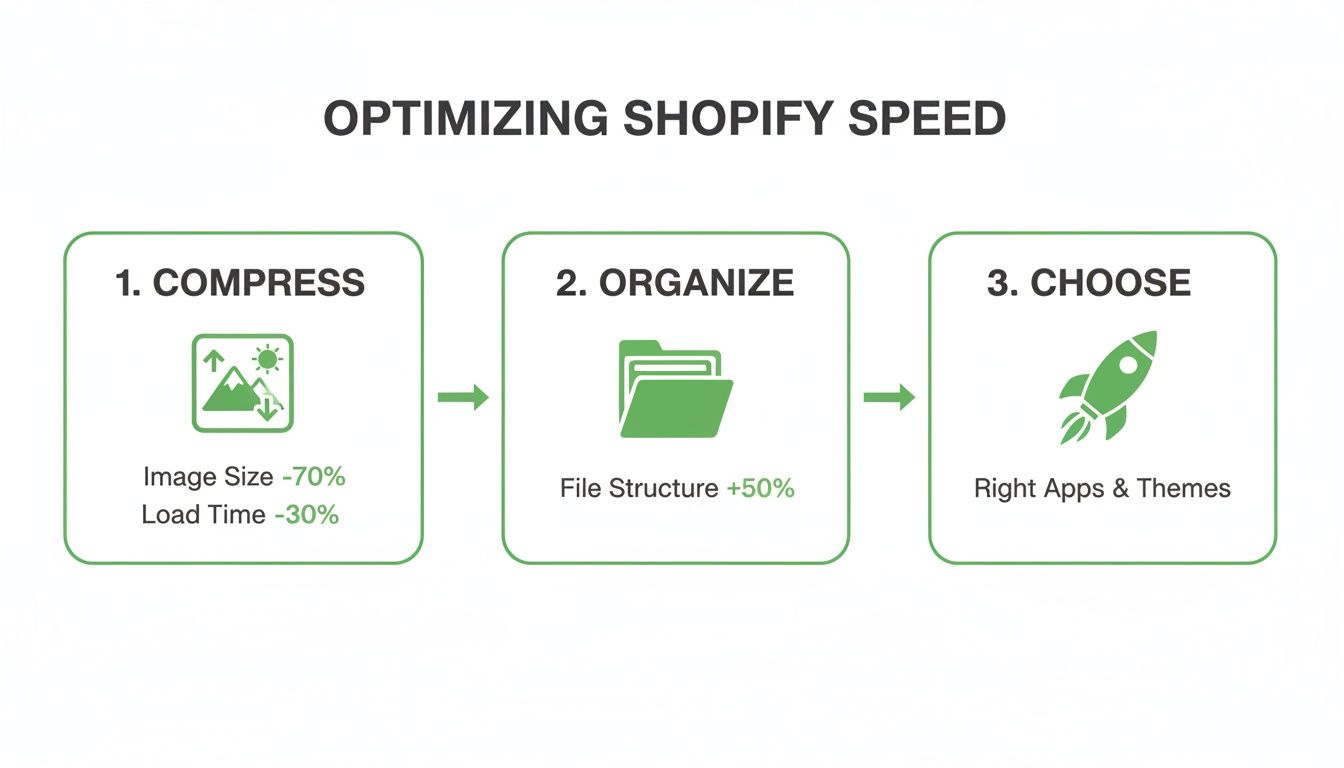
As the graphic shows, a systematic approach to your site's technical health is a prerequisite for scaling content successfully. A fast site enhances the user experience for every single page you generate.
A Practical Example: Using AI to Scale Content
Let's make this real. Imagine you sell artisanal coffee beans and want to attract local customers across the country. Your goal is to create pages targeting phrases like "specialty coffee beans in Portland" or "fresh roasted espresso in Miami."
Step 1: Create Your Spreadsheet.
Make a simple Google Sheet with columns for City and State. This is your data.
Step 2: Design Your Page Template.
In Shopify, create a new page template. The title might be: Fresh Roasted Coffee Beans in [City], [State]. The page content would use these placeholders: "Get the finest single-origin coffee, delivered fresh to your door in [City]. We offer next-day delivery for all local orders."
Step 3: Supercharge with AI.
Here's where it gets powerful and easy. Manually writing unique descriptions for hundreds of cities would be impossible. Instead, you can use an AI tool like ChatGPT.
Expert Insight: Use AI to generate unique, high-quality paragraphs for each page. This avoids duplicate content and adds real value. You can give the AI a simple prompt like: "Write a 50-word paragraph about the coffee culture in [City]. Mention one local landmark."
For the Portland page, the AI might generate content about enjoying coffee in the rain. For Miami, it might write about sipping a cold brew on South Beach. This adds a unique, local flavor to each page with almost no manual effort.
Finding the Right Tools for the Job
You don't need to be a developer to do this. The Shopify App Store has tools that make programmatic SEO accessible.
- For creating templates, page builder apps like PageFly or Shogun offer drag-and-drop simplicity.
- For the data and generation part, look for apps specifically designed for "programmatic SEO" or "bulk page creation." These apps often connect directly to Google Sheets, letting you manage your data easily and then publish hundreds of pages to your store with one click.
By combining a simple spreadsheet, a flexible template, and the creative power of AI, you can execute a sophisticated SEO on Shopify strategy that drives highly-qualified traffic to your store with minimal ongoing effort. For a deeper dive into the systems that make this possible, check out resources on scaling and content automation.
Expanding Your Reach to International Markets

Selling products to customers in different countries is a massive opportunity, but just translating your site and calling it a day won’t cut it. To really succeed globally, you need to prove to both customers and search engines that you’re serious about creating a local experience. This is where international SEO comes in, making sure the right version of your store shows up for the right audience.
This isn't just about changing the language; it's about building trust. It means showing prices in the local currency, using the right dialect, and explicitly telling Google which version of a page is meant for which region. These are the pro-level tactics that turn a simple Shopify store into a global commerce engine.
Using Shopify Markets for a Seamless Experience
Thankfully, Shopify has made managing a global storefront much simpler with Shopify Markets. Think of it as a central hub for controlling how your store appears in different countries or regions. Instead of trying to juggle multiple separate stores, you can manage everything from one dashboard.
With Shopify Markets, you can easily:
- Set up local currencies: Let customers in the UK pay in pounds and shoppers in Germany pay in euros. This simple change builds immediate trust.
- Translate your store: Manage different language versions of your site for specific markets.
- Manage international domains: Use country-specific domains (like
.defor Germany) or subfolders (likeyourstore.com/de-de) to create a truly localised presence.
This tool handles a ton of the backend complexity, freeing you up to focus on creating a great experience for each new market you enter.
Demystifying Hreflang Tags
One of the most critical technical signals for international SEO is the hreflang tag. It’s basically a signpost for search engines. It's a small piece of code that says, "Hey Google, this English page is for users in the UK, and this German version of the exact same page is for users in Germany."
Without hreflang tags, Google might get confused and show your UK-focused page to a German shopper, which is a terrible user experience. The good news is that Shopify Markets helps implement these tags automatically when you set up different languages and domains—a massive help. This prevents duplicate content issues and ensures your customers land on a version of your site that feels like it was made just for them. To get a better handle on the nuances, you can explore more about the fundamentals of international SEO.
Making Your Products Stand Out with Structured Data
Once you’ve got customers landing on the correct regional page, you need your products to pop in the search results. This is where structured data, also known as Schema markup, becomes your secret weapon.
Structured data is a standardised way of giving Google specific information about a page's content. For a product page, you can spell out details like:
- The product's name
- Its price and currency
- The average star rating from reviews
- Whether it's in stock
When you provide this info, Google can display it directly in the search results as rich snippets. A listing with a 5-star rating and a price is far more likely to get clicked than a plain blue link. Most Shopify themes include basic product schema out of the box, but you can always enhance it with apps to include more details like review schema.
Expert Tip: Don't just translate your content—localise it. This means adapting your marketing messages, imagery, and even product selection to fit the cultural expectations of each market. What sells well in the US might need a completely different approach in Germany.
For markets like Germany, where Shopify holds a significant ecommerce platform market share of around 27%, these optimisations are crucial for standing out. German shoppers are particularly sensitive to trust signals and site performance, so having localised content, hreflang tags, and rich snippets addresses factors that directly lead to higher rankings and better conversions.
Your Top Shopify SEO Questions, Answered
Getting into the weeds with Shopify SEO always brings up a few common questions, especially when you're just starting to figure things out. Let's tackle some of the most frequent sticking points with clear, no-nonsense answers.
Does Shopify Really Have Good SEO Built-In?
Yes and no. Shopify gives you a brilliant technical starting point. You get things like an editable sitemap, clean URLs, and easy access to meta tags right out of the box. But that’s all it is—a starting point.
It's not a magic button for page one rankings. You still have to do the actual work: digging into keyword research, writing content that actually helps people, optimising your images, and building a site structure that makes sense.
Think of it this way: Shopify hands you a professional-grade kitchen, but you’re still the chef. The quality of the final meal depends entirely on your strategy and execution.
The Bottom Line: Shopify provides a rock-solid technical SEO foundation, but it won't rank your store for you. Your content, keyword strategy, and the experience you create for users are what will ultimately bring in organic traffic and sales.
How Long Until I Actually See Results From Shopify SEO?
Let's be clear: SEO is a long game. It’s a marathon, not a sprint. Typically, you can expect to see the first real signs of progress—like improved rankings for a handful of keywords—within 3 to 6 months of consistent work.
"Consistent work" means you're regularly optimising pages, publishing useful content, and chipping away at things like site speed.
If you're targeting super competitive products or keywords, it could easily take longer. The key is to keep moving. Small, steady improvements have a compounding effect over time, eventually leading to significant and lasting organic traffic. Don't get disheartened if you don't see an explosion of traffic overnight—nobody does.
Can I Do This Myself, or Do I Need to Hire an SEO Expert?
You can absolutely get started and manage the fundamentals of Shopify SEO on your own. Honestly, by following a detailed guide and mastering the on-page and technical basics, you’ll already be leagues ahead of most of your competitors.
Down the road, as your store grows, you might want to explore more advanced tactics like programmatic SEO at scale or a serious link-building campaign. That's when bringing in an expert can pour fuel on the fire and really accelerate your growth.
A great approach is to handle it yourself first. Get a feel for the process, understand what moves the needle, and then hire specialist help when you're truly ready to scale up.
At Programmatic SEO Hub, we focus on giving you the educational resources and toolkits to master strategies that create scalable, long-term growth. Dive into our guides and templates to future-proof your entire content strategy. https://programmatic-seo-hub.com/en
Related Articles
Mobile friendly test google: A Practical Guide to Master Mobile SEO
Even though Google’s standalone Mobile-Friendly Test tool is a thing of the past, the principle behind it is more critical than ever. The simple truth is that Google now overwhelmingly uses its...
A Practical Guide to Competitive Analysis Keywords
When we talk about competitive analysis keywords, we're really talking about the search terms that are already making money for your rivals. By digging into these, you uncover their entire...
Landing Pages SEO A Practical Guide to Rank and Convert
When we talk about SEO for landing pages, we're not just talking about general website optimisation. We're getting hyper-specific. This is the art of building and refining standalone pages...