Your Ultimate Guide to Page Sitemap XML for Programmatic SEO

Think of a page sitemap XML as a direct line of communication with search engines. It’s essentially a neatly organised list of all the important pages on your website, designed to help crawlers like Googlebot discover and index your content without any guesswork.
Understanding the Role of a Page Sitemap XML
Imagine a search engine bot arriving at a massive new shopping centre for the first time. Without a directory, it would have to wander down every corridor to figure out what’s inside. It might miss entire sections or get lost in dead ends.
The page sitemap XML file is that directory. It hands the bot a clear, organised map, pointing out every single shop (your URLs) you want it to visit.
This isn't just about pointing out pages the crawler might have missed. It's about efficiency. A solid sitemap ensures even your deepest pages, those buried several clicks from the homepage, get noticed quickly.
Why Sitemaps Are Critical for Programmatic SEO
For a small blog with 50 pages, a sitemap is good practice. For a programmatic SEO project pushing out thousands, or even millions of pages, it's absolutely non-negotiable.
When you're creating content at that scale, you can't just hope crawlers will stumble upon every new page through your internal linking structure. It’s just not going to happen.
A sitemap becomes your most important tool for telling search engines:
- "Hey, look! I just published all these new pages." This dramatically speeds up the discovery process, getting your content indexed and in front of users much faster.
- "These are the pages that matter." By including a URL, you're giving it a stamp of approval, signalling that it's ready for search results.
- "I've just updated this content." This prompts crawlers to revisit specific pages, ensuring your search listings stay fresh.
In essence, a sitemap turns crawling from a game of hide-and-seek into a guided tour. For pSEO, that efficiency is the difference between getting thousands of pages indexed in days or having them languish in obscurity for months.
By handing over this clean roadmap, you help search engines spend their limited crawl budget wisely on your most valuable content. This direct line of communication is fundamental to making programmatic SEO work. If you're new to the concept, it’s worth digging into the fundamentals of XML sitemaps to really get it.
Without this simple file, the dream of scaling your organic traffic with pSEO falls apart. The faster Google finds your pages, the faster they can start ranking and pulling in traffic. It's that simple.
Decoding the Structure of an XML Sitemap

At first glance, a page sitemap XML file might look like a messy wall of code. Don't worry, it's actually incredibly simple and logical once you see what’s going on.
Think of it like a neatly organised spreadsheet made just for search engines. Each row is a single page on your site, and the columns give crawlers the essential details they need. The whole file is wrapped in <urlset> tags, which is just a signal to bots that says, "Hey, everything inside here is a big list of URLs."
Within that main container, every single page gets its own <url> block. This little block acts as a folder, holding all the crucial information Google needs about that specific page.
The Essential Building Blocks
Inside each <url> block, you’ll find a few key tags. These are the absolute must-haves that make your sitemap work. Honestly, for most pSEO projects, these are all you need.
Let’s break down the most common tags you’ll encounter and what they actually do.
| XML Tag | Purpose | Best Practice Example |
|---|---|---|
<urlset> |
The main container. It wraps the entire list of URLs. | Required. This is the root element of the file. |
<url> |
A parent tag for each individual URL's information. | Required. You'll have one of these for every page. |
<loc> |
Holds the full, absolute URL of the page. This is non-negotiable. | <loc>https://www.yourdomain.com/page-slug</loc> |
<lastmod> |
Specifies the date the page content was last modified. | <lastmod>2024-10-26</lastmod> (YYYY-MM-DD format) |
As you can see, the core structure is very straightforward. You’re just telling search engines: "Here's the page, and here's when it was last touched."
Here's what that looks like in a super simple example for just one page:
That’s it. To build out your full sitemap, you just repeat that <url> block for every page you want indexed. When you're dealing with thousands of programmatic pages, the structure stays exactly the same—the file just gets a lot longer.
For massive projects, you'll eventually need to split your sitemap into multiple files and group them together in what’s called a sitemap index. It’s like a table of contents for all your sitemaps. You can explore sitemap index files in our detailed guide.
The Tags You Can Safely Ignore
You might stumble across two other tags in some sitemaps: <changefreq> and <priority>. A long time ago, SEOs used these to give search engines hints about how often a page changes and how important it is compared to other pages on the site.
Things have changed. Google has flat-out confirmed that it pretty much ignores these tags now. Its crawlers are far more sophisticated and can figure this stuff out on their own by just observing your site's behaviour over time.
Google’s own documentation calls the
<priority>tag a "hint" at best and makes it clear that it has no impact on your ranking. Your time is much better spent focusing on<loc>and<lastmod>.
Honestly, trying to set priority levels for 10,000 programmatic pages is a fool's errand and delivers zero SEO benefit. Just make sure your URLs are correct and your <lastmod> dates are accurate.
By keeping your page sitemap clean and focused on these core elements, you give search engines exactly what they want: a clear, direct, and useful map to your content. No extra fluff needed.
How to Create and Submit Your Sitemap

Knowing what a page sitemap XML is and what goes inside it is one thing. Actually creating and submitting it is where the rubber meets the road. Let’s walk through how to generate your sitemap, especially for large-scale projects, and get it into Google’s hands.
Generating Your Sitemap With Common Tools
If you're using a Content Management System (CMS) like WordPress, making a sitemap is incredibly easy. Popular SEO plugins handle it for you automatically.
- Yoast SEO: This plugin automatically creates a comprehensive sitemap for your posts, pages, and other content types. You can usually find it by going to
yourdomain.com/sitemap_index.xml. - Rank Math: Much like Yoast, Rank Math generates and updates your sitemap for you, giving you control over what to include or exclude.
These tools are perfect for standard websites. They automatically add new pages and update them when you make changes, so your sitemap always stays fresh.
Automating Sitemaps for Programmatic SEO with AI
When your pages are generated from a database—like a spreadsheet of cities, products, or services—you need an automated way to build your sitemap. This is where the real power of programmatic SEO comes in.
Here's a simple, practical way to do it using AI and automation, broken down for beginners:
- Prepare Your Data: Start with a clean database, like a Google Sheet. Each row is a future webpage. Have columns for your main keyword (e.g., "plumbers in [City]"), the city name, state, and maybe some unique data points like a local phone number or a fun fact about the area.
- Generate Content with AI: Use a tool that connects to OpenAI's GPT or a similar AI model. The goal is to create a unique paragraph or two for each row in your sheet. You can give the AI a prompt like: "Write a 150-word introduction about plumbing services in [City], [State], mentioning a local landmark." The tool then fills a new column in your sheet with this AI-generated content for every city.
- Build Your Pages: Use a no-code website builder like Webflow or a custom script to automatically create a new webpage for each row in your spreadsheet. The page template pulls in the city name, the AI-generated content, and other data to make thousands of unique pages.
- Automate Sitemap Creation: As your pages are created, you need to add their URLs to your sitemap. You can use an automation tool like Make or Zapier. Set up a workflow that says, "When a new page is published, add its URL and the current date to my sitemap.xml file." This ensures your page sitemap XML is always a perfect mirror of your live pages.
This process turns a simple spreadsheet into a massive, content-rich website, with a sitemap that updates itself automatically. To properly structure your site for search engines, learning the specifics of How To Create A Sitemap is fundamental.
Submitting Your Sitemap to Search Engines
Once your sitemap exists at a public URL (like yourdomain.com/sitemap.xml), the final step is to hand it over to Google. This is done through Google Search Console, an absolutely essential free tool for anyone with a website.
Submitting your sitemap is like knocking on Google's door and handing them the blueprints to your building. It’s a clear signal that you have new or updated content ready for them. If you need a refresher, check out our guide on how to get started with Google Search Console.
Here’s the step-by-step:
- Sign In: Log into your Google Search Console account and pick your website property.
- Navigate to Sitemaps: In the menu on the left, under the "Indexing" section, click on "Sitemaps."
- Add Your Sitemap URL: You'll see a field at the top asking you to "Add a new sitemap." Just type in the end of your sitemap’s URL (e.g.,
sitemap.xmlorsitemap_index.xml). - Click Submit: Hit the "Submit" button.
And that's it! Google will queue your sitemap for processing. You’ll see the status change to "Success." This dashboard is now your go-to spot for checking how many URLs Google has discovered from your map and if it found any errors.
Optimising Sitemaps for Large-Scale SEO Projects
When you’re dealing with a programmatic SEO project that scales from a few dozen pages to thousands, the old rules just don't apply anymore. A single, giant page sitemap XML file isn't just inefficient—it's a liability. To keep search engines happy and your indexing running smoothly on a massive site, you need a much smarter, more organised approach.
This is where the sitemap index file saves the day. Think of it as a simple table of contents for all your individual sitemaps. Instead of one huge file listing every URL, you give search engines a neat index file that points them to smaller, well-organised sitemap files. This isn’t just a nice-to-have; it's a must for staying within technical limits.
In the German market, for instance, this is just business as usual. With over 34 million .de domains registered as of 2023, XML sitemaps are essential for managing websites at a massive scale. Google also has strict limits: a sitemap can't have more than 50,000 URLs or be larger than 10MB uncompressed. For a big German e-commerce site or news portal, hitting these limits is easy, making sitemap indexes an absolute necessity to get everything indexed. You can read more about these technical SEO details on Arocom.de.
Splitting Sitemaps for Better Crawl Efficiency
Breaking your master list of URLs into smaller, logical sitemaps does more than just keep you under the size limits. It’s a powerful move for crawl efficiency and makes finding problems a whole lot easier. When Googlebot can process smaller, focused files, it can crawl your site more intelligently.
Here are a few practical ways you can split, or "shard," your sitemaps:
- By Category or Template: Group pages by their type. An e-commerce site could have
products-sitemap.xml,categories-sitemap.xml, andblog-sitemap.xml. This is incredibly handy for spotting indexing issues in a specific part of your site. - By Date: If you're publishing content all the time, like a news site or a programmatic blog, splitting by date (e.g.,
sitemap-2024-10.xml) is a great idea. It puts your newest content in a fresh sitemap, signalling to Google that it's important. - Alphabetical or Numerical Sharding: For massive, uniform sets of pages (like a business directory), you can simply split them alphabetically (A-C, D-F, etc.) or by a numerical ID.
By organising your sitemaps this way, you make troubleshooting a breeze. If Google Search Console flags an error in
products-sitemap-part3.xml, you know exactly where to start looking, rather than hunting through a file with 50,000 mixed URLs.
This structured approach is a cornerstone of scaling content well. To see how sitemaps fit into the bigger picture of high-volume content strategies, check out this Programmatic SEO ultimate guide.
Automating Lastmod for Freshness Signals
One of the most powerful—and most overlooked—tags in your page sitemap XML is <lastmod>. It tells search engines the exact date and time a page was last changed. For programmatic projects, keeping this tag accurate is a golden opportunity to give your SEO a real boost.
When you update a batch of pages—maybe you’re refreshing product prices, updating stats, or adding new user comments—you need to tell Google about it. Manually updating thousands of <lastmod> dates is out of the question. Automation is the only way forward.
A simple programmatic script can handle this perfectly. The logic works like this:
- Monitor Your Database: The script keeps an eye on your data source (like Airtable, Google Sheets, or a custom database) for any changes.
- Trigger an Update: When a change is detected, the script automatically updates the
<lastmod>timestamp for that page in the right sitemap file. - Ping Search Engines: After updating the sitemap, the script can then "ping" Google to let it know the sitemap has changed, encouraging a faster re-crawl.
This automated flow turns your sitemap from a static list into a dynamic tool that actively nudges search engines to revisit your pages. It reinforces content freshness, which is a known ranking signal, and makes sure your search results show the latest version of your content. You can see a more detailed breakdown of this process in our guide on scheduling automated content updates. By optimising your sitemaps this way, you move beyond just listing URLs and start strategically guiding crawler behaviour at scale.
Solving Common Sitemap Errors
So, you’ve submitted your page sitemap XML. Great first step. But the real work often starts when Google Search Console throws up a bunch of errors. Those cryptic messages can look intimidating, but they’re usually surprisingly straightforward to fix once you know what they mean.
Think of it this way: a clean sitemap is a sign of a well-maintained, healthy website. It builds trust with search engines. When you sort out errors quickly, you're making sure crawlers don't waste their limited time and can get straight to discovering and indexing your most important pages.
Translating Common Search Console Errors
When Google spots a problem, it’ll tell you in its Sitemaps report. Don't panic. Most issues fall into just a few common buckets. Let's decode the most frequent ones and look at exactly how to solve them.
'Sitemap could not be read': This is a catch-all error that means Google couldn't even process your file. The culprit is almost always a simple typo in the XML syntax—a forgotten closing
</url>tag or a wonky URL. Just double-check your file for any formatting mistakes.'URLs blocked by robots.txt': This is a classic case of sending mixed signals. You've put pages in your sitemap, but you're also telling search engines not to crawl them in your
robots.txtfile. It's a direct contradiction. The fix? Either remove the URL from the sitemap or delete the "Disallow" rule in yourrobots.txt.'Sitemap contains URLs which are blocked by a 'noindex' tag': This is the same idea as the
robots.txtissue. You're listing a page in the sitemap (basically saying "please index this") while the page itself has a meta tag telling Google to do the exact opposite. Your solution is to either remove the 'noindex' tag from the page or take the URL out of your sitemap.
A sitemap should only ever contain the URLs you actually want indexed—the "good" pages. Including redirected, blocked, or non-canonical URLs is like adding disconnected roads to your map; it only creates confusion and wastes crawl budget.
This diagram shows how a sitemap index file helps to organise multiple, smaller sitemap files, which is essential for larger websites.
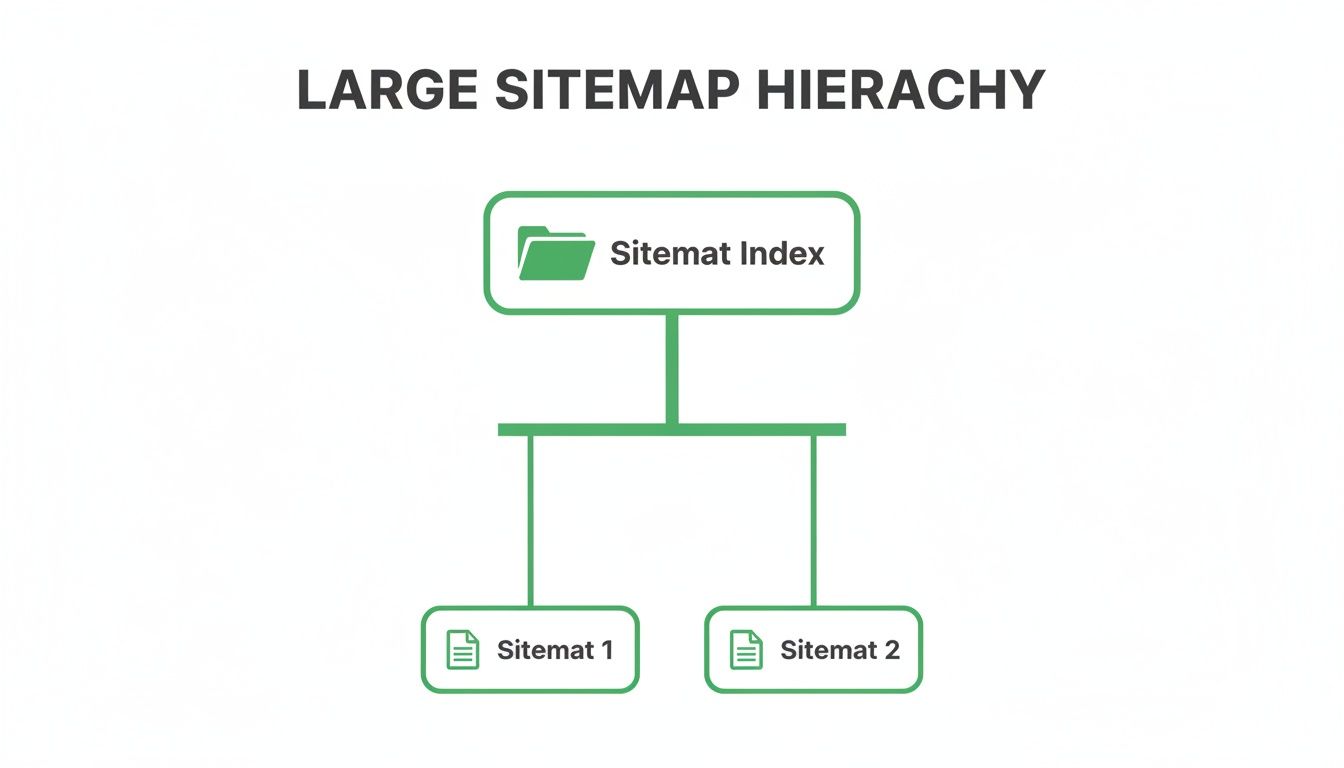
Using a sitemap index is a best practice that helps crawlers process your content more efficiently and makes troubleshooting a whole lot easier.
Fixing Silent Sitemap Killers
Now for the tricky part. Some of the most damaging issues won't trigger obvious errors in Search Console at all. I call these the "silent killers" because they quietly degrade your sitemap's quality and hurt your SEO over time.
For German websites, one critical element is correctly handling localisation with hreflang tags inside the sitemap. With 78% of searches being local, clearly signalling language and country variants is absolutely vital. For instance, a page targeting Germany must link to its Swiss-German counterpart using specific xhtml:link tags to ensure precise geotargeting. This is an essential protocol, especially since .de sites capture the vast majority of German traffic. For more detail, you can dig into Google's official documentation on implementing localised versions.
You should also stay vigilant for these other common problems:
- Including Non-Canonical URLs: Your sitemap should only list the one true "canonical" version of each page. Adding duplicates or variations just signals a messy site structure.
- Listing Redirected URLs (301s): Why send a crawler to a page that just sends it somewhere else? That’s a waste of time. Always update your sitemap to point directly to the final destination URL.
- Pages with 404 Errors: A URL that returns a "Not Found" error has no business being in a sitemap. It’s a dead end. Make sure to regularly crawl your own site to find and remove these broken links.
By proactively diagnosing these issues, you keep your page sitemap XML clean and effective. For a deeper dive into troubleshooting individual URL problems, you might find our guide on using the URL Inspection tool helpful.
Frequently Asked Questions About Page Sitemaps
Let's dig into some of the most common questions that pop up when you're dealing with a page sitemap XML. I'll give you some clear, straightforward answers to help you get things right and sidestep the usual mistakes.
Do I Need a Sitemap for a Small Website?
Yes, you absolutely do. It’s true that Google is pretty good at finding all the pages on a small site just by following internal links, but a sitemap gives you a few hidden advantages that make it well worth the effort.
Think of it as giving Google an express lane to your content. When you publish a new blog post, the fastest way to let Google know it exists is to update your sitemap and ping them through Search Console. This can slash the time it takes for your new page to get discovered and indexed, which is a huge leg up over just waiting for crawlers to stumble upon it.
How Often Should I Update My Sitemap?
The right answer here depends entirely on how often your content changes. There's no single rule for everyone, but the principle is simple: your sitemap needs to be an accurate, up-to-date map of your live pages.
- For static sites: If your pages hardly ever change, you only need to touch the sitemap when you add, remove, or make a major update to a page.
- For dynamic sites: If you're publishing blog posts every day or running a programmatic project that adds new pages constantly, your sitemap needs to keep up. This is where automation is your best friend, ensuring the sitemap is rebuilt every time new content goes live.
The rule of thumb is this: an outdated sitemap pointing to old, dead pages is worse than having no sitemap at all. Keep it fresh.
Can a Sitemap Hurt My SEO Performance?
It’s surprising, but yes. A badly managed page sitemap XML can do more harm than good by sending all the wrong signals to search engines. You won't get a direct ranking penalty, but you can easily waste your crawl budget and make your site look neglected.
Here are the most common ways a sitemap can backfire:
- Including Low-Quality Pages: Your sitemap should be a curated list of your best work. Tossing in thin content, broken pages (404s), or URLs you’ve blocked in
robots.txttells Google you don’t care about quality control. - Listing Non-Canonical URLs: Adding multiple versions of the same page just confuses crawlers. They won't know which one is the "real" version, which can dilute your SEO authority.
- Having a Bloated, Outdated File: A sitemap clogged with thousands of old, redirected URLs is a massive waste of crawl budget. Googlebot ends up chasing ghosts instead of crawling your important new content.
Keep your sitemap clean and focused only on high-quality, indexable URLs. That way, it remains a powerful tool for boosting your site's visibility, not a liability.
Ready to scale your content strategy the right way? The Programmatic SEO Hub offers the templates, tools, and step-by-step guides you need to build a powerful organic growth engine. Explore our free resources and master programmatic SEO today. Find out more at https://programmatic-seo-hub.com/en.
Related Articles

Mobile friendly test google: A Practical Guide to Master Mobile SEO
Even though Google’s standalone Mobile-Friendly Test tool is a thing of the past, the principle behind it is more critical than ever. The simple truth is that Google now overwhelmingly uses its...

A Practical Guide to Competitive Analysis Keywords
When we talk about competitive analysis keywords, we're really talking about the search terms that are already making money for your rivals. By digging into these, you uncover their entire...

Landing Pages SEO A Practical Guide to Rank and Convert
When we talk about SEO for landing pages, we're not just talking about general website optimisation. We're getting hyper-specific. This is the art of building and refining standalone pages...