Landing Page SEO: A Practical Guide to Higher Conversions
Landing page SEO is all about getting a single, focused web page to rank in search engines for a specific keyword. The goal? To drive a clear action, like a sale, a download, or a sign-up. It's a delicate dance, blending the science of search visibility with the art of turning visitors into customers. You're trying to make both Google and your potential customers happy at the same time.
Why Most Landing Pages Fail at SEO
Ever built a stunning landing page that absolutely crushes it with paid traffic, yet it's a complete ghost on Google? You're definitely not alone. It's a classic marketing mistake: assuming you have to choose between a design that converts and a structure that ranks.
Too often, marketers create pages only for ad campaigns. These pages are typically stripped-down, with minimal text, aggressive calls-to-action, and a laser focus that completely ignores what search engines need to see. They’re built for an audience that already has context from an ad, not for someone arriving cold from a search query. That disconnect is a major red flag for both users and search crawlers.
The Conflict Between Conversion and SEO
The root of the problem is a clash of priorities. A page built purely to convert might have a punchy headline, a slick video, and a massive sign-up form—and that's about it. While that might work wonders for a targeted ad click, Google sees it as thin, shallow content. It just doesn't have the depth or substance to be considered a top-tier answer to someone's question.
Think about it: a page with 150 words might be enough to convince a visitor from a Facebook ad, but Google will struggle to understand its relevance when a competitor has a 1,500-word deep-dive on the same topic. Many teams find it tough to create content that’s meaty enough for SEO without cluttering the clean, conversion-focused design. If you're not careful, you end up with what search engines call thin content, which can drag down your site's overall authority.
To help you visualise these priorities, here's a quick breakdown of what it takes to succeed.
Core Pillars of Landing Page SEO Success
| Pillar | Objective | Key Actions |
|---|---|---|
| Intent Alignment | Match the user's search goal precisely. | Map keywords to informational, transactional, or commercial queries. |
| Content Depth | Provide comprehensive, valuable information. | Answer related questions, use multimedia, and go beyond the basics. |
| User Experience (UX) | Create a seamless and persuasive journey. | Ensure fast load times, mobile-friendliness, and clear CTAs. |
| Technical Health | Make it easy for search engines to crawl and index. | Use clean URLs, structured data, and proper meta tags. |
Ultimately, a winning landing page needs to check all these boxes to perform well in organic search.
The real challenge isn't choosing between SEO and conversions; it's about integrating them. The best landing pages are built with an intent-first approach, where understanding the user's goal dictates both the content strategy and the conversion path.
This guide is your practical roadmap for bridging that gap. We’ll walk through how to align with user intent, nail the on-page elements, sort out the technical essentials, and even scale your efforts with a bit of automation. Consider this your playbook for transforming those invisible pages into powerful engines that drive both organic traffic and conversions.
Decoding User Intent for Better Landing Pages
Great landing page SEO has very little to do with just targeting a keyword. It’s about getting inside the head of the person searching. You have to figure out the why behind their query. Are they just kicking tyres and gathering info, or are they ready to buy right now? That's the entire game of user intent.
Think about a search like "best project management software". This person is almost certainly in the research phase, comparing their options. A landing page that immediately shoves a "Buy Now" button in their face is destined to fail.
What they actually want is a detailed comparison, a free trial, or maybe a downloadable guide. A page that delivers on that promise is a page that aligns perfectly with their needs.
This alignment is exactly what Google's algorithm is designed to reward. When your page gives a searcher the answer they're looking for, they stick around, they engage, and they don't hit the back button. These are huge signals to Google that your page is a quality result, which directly helps your rankings.
Identifying Different Types of User Intent
To build a page that truly connects, you need to classify the intent first. It's not always black and white, but most search queries fall into a few key buckets. Nailing this down helps you craft the right headline, content, and call-to-action (CTA) to meet their expectations head-on.
Here’s a simple way to think about it:
- Informational Intent: The user wants an answer or needs to learn something. Keywords often contain phrases like "how to," "what is," or "guide." A search for "how to fix a leaky tap" is pure information seeking. The right content is a blog post or a guide, not a sales page.
- Commercial Investigation: The user is thinking about making a purchase and is weighing up their options. You'll see searches like "asana vs monday," "best CRM for small business," or "sony headphones review." They're getting close to converting but need more data. A comparison page or a detailed product overview works best here.
- Transactional Intent: The user is ready to make a move. These keywords are specific and often include terms like "buy," "discount," "price," or a direct product name like "buy iPhone 15 pro." This is where a classic, conversion-focused landing page shines.
Analysing these subtle differences helps you avoid the classic mistake of building a sales-focused page for an informational keyword. If you want to go deeper on this, you can learn more about the fundamentals of search intent in our detailed guide.
Practical Ways to Uncover User Intent
So, how do you figure this all out without just guessing? The answers are usually hiding in plain sight—right on the search results page.
Your first move should always be to search your target keyword on Google and see what shows up. Is the first page filled with blog posts and guides (informational), or is it all product pages and pricing tables (transactional)? Google is telling you exactly what type of content it wants to rank.
Next, find the "People Also Ask" (PAA) box. These are the exact questions your audience is asking. If you spot questions like, "Is X worth the money?" or "What are the alternatives to Y?", you're looking at commercial investigation. Weaving answers to these questions directly into your landing page content can be a massive win.
Don't just copy what your competitors are doing; figure out why it's working for them. The search results page is a living document that tells you exactly what Google thinks users want for that query.
Finally, dive into forums like Reddit or Quora. Search for your keyword and just read the conversations. You'll find completely unfiltered discussions, problems, and questions from real people. For a software tool, you might find users debating specific features; for a physical product, they might be asking about shipping times or return policies. This is SEO gold.
By blending these research tactics, you'll move way beyond simple keyword matching. You’ll start creating landing page experiences that feel like a direct, personal answer to a user's problem, which is how you build trust and drive both rankings and conversions.
Crafting On-Page Content That Ranks and Converts

Okay, you’ve figured out what a user really wants. Now it's time to build the on-page experience that delivers on that promise. This is where we move from theory to practice, turning that blank page into a powerhouse that walks a user from their search query straight to a conversion.
Good landing page content isn't just about scattering keywords around. It’s about creating a compelling story that hits on the user's pain point, presents your product as the clear solution, and makes them trust you—fast. Every single element, from the headline down to the final button, has to work together.
When you get this right, technical landing page SEO stops feeling like a chore and becomes a creative exercise in genuine persuasion.
The Anatomy of a High-Performing Landing Page
Think of your landing page as a short, focused conversation. Your first job is to grab their attention and confirm they're in the right place. Then you explain how you can help, prove you're the real deal, and tell them exactly what to do next.
A successful page guides this conversation with a few key components:
- A Magnetic H1 Headline: This is your first impression. It needs to immediately echo their search query and promise a clear, tangible benefit. No fluff.
- Compelling Body Copy: Talk about benefits, not just features. Instead of saying, "Our software has 256-bit encryption," try, "Keep your data completely safe and secure." Speak their language.
- Clear Trust Signals: Testimonials, case studies, customer logos, security badges, industry awards—these are non-negotiable. They build the confidence needed to take action.
- A Singular, Obvious Call-to-Action (CTA): Don't give them too many choices. One page, one goal. Make the button or form so obvious they can't possibly miss it.
When you structure your page around these core pillars, you create a logical path that makes it easy for the user to say "yes."
Weaving Keywords in Naturally
Keyword integration should feel completely invisible to the reader. Of course, your main keyword needs to be in a few strategic spots, but the real magic is in using related terms and synonyms to show search engines you understand the topic inside and out.
Here are the prime spots for your primary keyword:
- Your H1 Headline: The most critical placement. Be direct.
- The First 100 Words: Set the stage early to signal relevance to both users and search engines.
- One or Two Subheadings (H2s/H3s): Use them to break up content and guide the reader.
- Image Alt Text: A great spot to add context for accessibility and SEO.
But don't stop there. If your page is about "project management software," your copy should naturally include phrases like "task tracking," "team collaboration," and "Gantt charts." These are the semantic and long-tail keywords that prove your expertise.
The rule is simple: write for humans first, search engines second. When your content is genuinely helpful, it will naturally contain the exact phrases Google is looking for.
Building Instant Trust and Credibility
A visitor who doesn't trust you will never convert. It's that simple. Trust signals are the shortcuts you use to prove you're a legitimate, reliable business and that they're making a safe choice.
For example, in the German market, trust is everything. Displaying a well-known certification like Trusted Shops can boost conversion rates by up to 23%. Even something as basic as a proper Impressum (legal notice) and a visible office address has been shown to slash shopping cart abandonment by a staggering 68%.
To see how you can apply similar principles to your own pages, diving into these 10 Essential Landing Page Optimization Best Practices is a fantastic next step. Marrying smart SEO with proven conversion tactics is how you turn clicks into loyal customers.
Technical SEO Essentials for Every Landing Page
Let’s be honest, "technical SEO" can sound intimidating. But behind the jargon are a few simple, crucial elements that make sure search engines can actually find, understand, and rank your landing page. Think of it as the solid foundation your amazing content is built upon.
Without these technical essentials in place, even the most persuasive landing page will remain invisible. The good news? You don't need to be a developer to get the basics right. We’re going to break down the must-haves that every landing page needs to succeed.
These elements are all about user experience, which is a massive ranking factor for Google. A slow, clunky, or broken page sends users running—and search engines take note.
Make Your Page Lightning Fast
Page speed isn't just a "nice to have"; it's a cornerstone of modern landing page SEO. When a user clicks your link, you have just a few seconds to deliver before they get impatient and hit the "back" button. A slow page is a direct path to a high bounce rate.
This is especially critical in competitive markets. For instance, user behaviour in Germany heavily influences SEO success, where the top three organic positions capture 75% of all clicks. A page that lags by even a second can be the difference between ranking on page one and being lost in the digital abyss. You can explore detailed insights on German search user behaviour to understand just how vital speed is.
Here are a few practical ways to speed things up:
- Compress Your Images: Large image files are the number one cause of slow pages. Use a free tool like TinyPNG to shrink image sizes without losing quality.
- Minify Code: This just means removing unnecessary characters from your HTML, CSS, and JavaScript files. Most modern website builders and plugins can handle this automatically.
- Enable Browser Caching: Caching lets a visitor's browser "remember" parts of your page, so it doesn't have to reload everything on their next visit. This makes repeat loads much faster.
Master the Core Web Vitals
Connected directly to speed are Google's Core Web Vitals. These are specific metrics that measure the real-world user experience of your page. You don't need to get lost in complex definitions, just what they represent in simple terms.
Core Web Vitals are Google's way of measuring a user's first impression. They check how quickly your page loads, how fast it becomes interactive, and how visually stable it is while loading.
The three main components are:
- Largest Contentful Paint (LCP): How long does it take for the main content (like a big image or headline) to appear? Aim for under 2.5 seconds.
- First Input Delay (FID): How quickly does your page respond when a user tries to interact with it (e.g., clicks a button)? The goal is less than 100 milliseconds.
- Cumulative Layout Shift (CLS): Does your page jump around as it loads, causing users to accidentally click the wrong thing? A low score here means a stable, non-frustrating experience.
You can easily check your page's scores using Google's free PageSpeed Insights tool. It will give you a clear report and suggestions for improvement. If you want to dive deeper, be sure to check out our detailed guide on understanding Core Web Vitals.
Ensure Flawless Mobile Performance
Today, optimising for mobile isn't optional; it's the standard. Google primarily uses the mobile version of your site for indexing and ranking, a practice known as mobile-first indexing. If your landing page looks and works poorly on a phone, your rankings will suffer. Period.
This goes beyond just making text readable. Buttons should be easy to tap, forms simple to fill out, and navigation straightforward. Test your page on an actual smartphone—don't just rely on your desktop browser's mobile view. A truly mobile-friendly experience is seamless and intuitive, ensuring you don't lose potential conversions from the majority of users who browse on their phones.
Scaling Your Strategy With AI and Programmatic SEO
Imagine creating hundreds of unique, optimized landing pages without endless manual work. This isn't a futuristic dream; it's the reality of programmatic SEO (pSEO). It’s a simple but powerful method that lets you scale your landing page strategy by turning a spreadsheet into a traffic-generating machine.
At its core, pSEO means using a template and a database (like a Google Sheet) to automatically generate pages at scale. Think of it like a mail merge, but for your website. You design one master landing page, then automatically populate it with unique data from your spreadsheet to create countless variations.
This approach is perfect for businesses with many locations, products, or services. Instead of manually building a page for "plumbers in Berlin," another for "plumbers in Hamburg," and a third for "plumbers in Munich," you can generate all of them in minutes.
Step 1: Find Your Scalable Keyword Pattern
First, you need to find a repeatable formula that people use when searching for what you offer. This is the key to unlocking thousands of specific, long-tail keyword opportunities.
Common patterns often look like this:
- [Service] in [Location]: "emergency plumbing in Berlin"
- [Product] for [Use Case]: "crm software for small gyms"
- How to [Solve Problem] with [Tool]: "how to fix a leaky tap with a wrench"
- [Brand] Alternative: "cheaper alternative to Mailchimp"
Once you find a pattern that fits your business, you’ve found your programmatic opportunity.
Step 2: Build Your Spreadsheet and Template
Your spreadsheet is the engine for your pSEO project. For a local service business, your columns might be City, Neighborhood, and a unique selling point like Emergency Service Area. Each row in this sheet will become its own unique landing page.
Next, you design your master template. This is a single page layout with placeholders where your data will go. For example, your H1 headline might be: Reliable Plumbing Services in {{City}}.
When the pages are generated, the system automatically swaps {{City}} with the data from each row in your spreadsheet. This is how you create hundreds of unique pages like "Reliable Plumbing Services in Berlin" and "Reliable Plumbing Services in Hamburg" from just one template.
This process highlights the importance of the technical fundamentals of any landing page: it must be fast, mobile-friendly, and structured correctly.
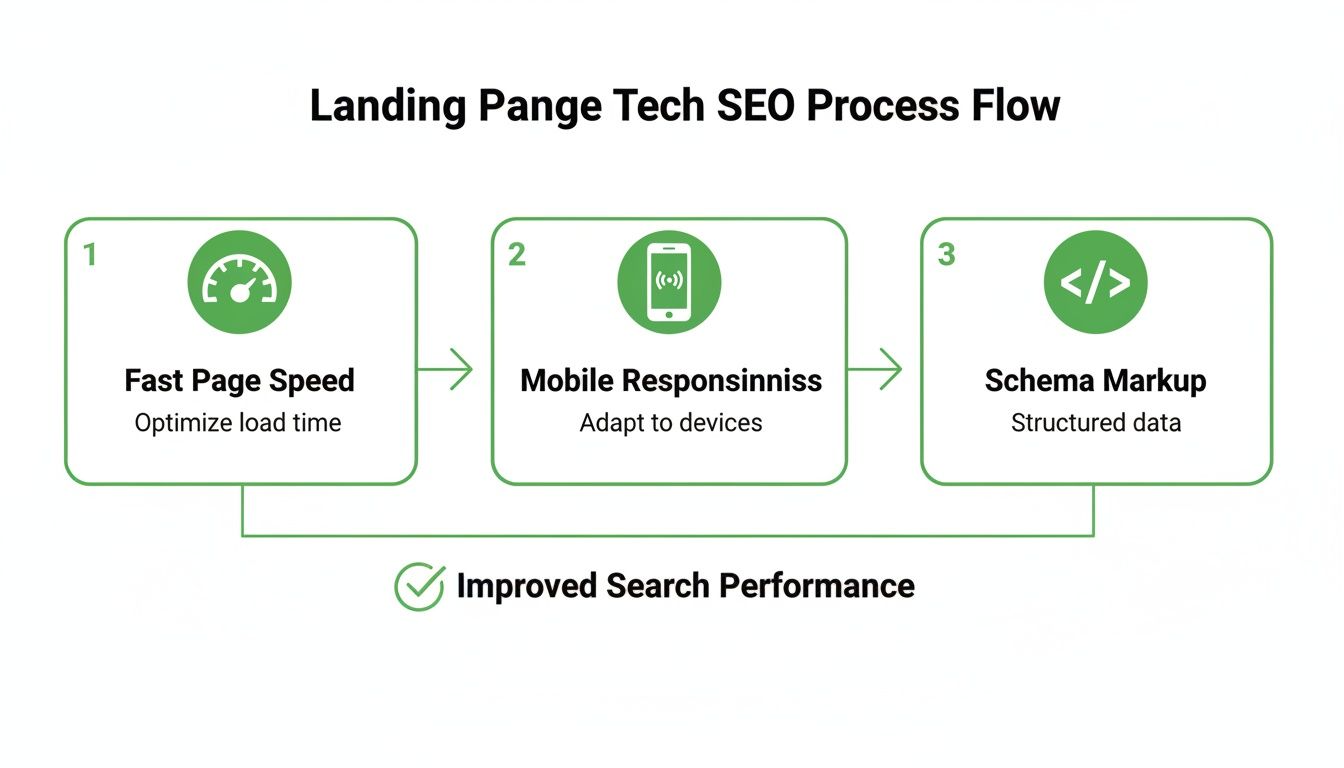
Whether you build one page or a thousand, getting the technical foundation right—speed, mobile design, and schema—is non-negotiable.
Step 3: Use AI to Create Unique Content at Scale
Here’s where it gets really practical. A common pSEO mistake is creating pages that are nearly identical except for a few swapped words. This can lead to duplicate content problems. AI helps you avoid this by generating genuinely unique text for every single page.
You can use a simple, structured prompt to ask an AI tool (like ChatGPT) to create endless variations. Here’s a practical prompt you can adapt:
"You are an expert copywriter. Write a 150-word introductory paragraph for a landing page for a plumbing company. The target city is {{City}}. Mention our key services: emergency repairs and boiler installation. Emphasize that we offer 24/7 service in the {{Neighborhood}} area and are known for our reliability."
By running this prompt for each row in your spreadsheet (swapping out {{City}} and {{Neighborhood}} each time), you get a slightly different intro for every page you create. This adds the uniqueness needed to keep both users and search engines happy. For a deeper dive, our guide on automating content creation for pSEO projects has more advanced techniques.
To really get ahead, you have to stay on top of the essential AI SEO tactics that are shaping how we gain visibility in search today.
A Simple Example
Let's say you run "Berlin Bike Repairs." Your keyword pattern is "[bike repair service] in [Berlin district]." Your spreadsheet has columns forDistrict(e.g., Kreuzberg, Neukölln) andCommon Problem(e.g., flat tyres, broken chains).Your template’s H1 is: "Fast {{Common Problem}} Repairs in {{District}}."
You use an AI prompt: "Write a short paragraph about the frustration of getting a {{Common Problem}} while cycling in {{District}} and how our quick repair service can help."
The result? Dozens of hyper-local, unique landing pages targeting specific user needs, all created from one template and one spreadsheet. This is how you achieve massive scale with minimal effort.
Common Landing Page SEO Questions
As you get deeper into optimising your landing pages, a few common questions always seem to surface. It’s not always obvious how the rules change when you shift from a blog post to a page built for conversions. Let's clear up some of the most frequent sticking points marketers run into.
Think of this as your quick-fire FAQ for making the right call. We'll cover everything from text-light pages to the nitty-gritty of your technical setup, so you can move forward with confidence.
Can a Landing Page With Minimal Text Still Rank?
Yes, but it's an uphill battle. When a landing page is light on copy, its ability to rank on Google has less to do with traditional on-page content and almost everything to do with other powerful ranking factors.
For these kinds of pages, your SEO success hinges on technical perfection and off-page authority. You absolutely must have:
- Exceptional Page Speed: The page needs to load in a flash. With barely any content, there's zero excuse for a slow site.
- A Flawless Mobile Experience: It has to be designed perfectly for mobile users, featuring easy-to-tap buttons and super clear navigation.
- Strong, Relevant Backlinks: High-authority links from other sites become your number one signal for relevance and trust.
- Optimised Multimedia: Any images or videos must be compressed and have descriptive alt text to give search engines some context.
Schema markup also becomes incredibly important here. It's a way to spoon-feed Google information about the page's purpose without needing long paragraphs of text. The focus shifts from what you write to how well the page is built and how much clout it has earned from other places on the web.
Should I Use a Subdomain or a Subfolder?
For landing page SEO, a subfolder is almost always the better choice. This is one of the most straightforward decisions in technical SEO, and the reason is simple.
A subfolder structure looks like this: yoursite.com/landing-page.
A subdomain looks like this: landingpage.yoursite.com.
Search engines see a subfolder as part of your main website. That means any landing page you put in a subfolder instantly piggybacks on your primary domain's existing authority, trust, and ranking power. You're giving it a massive head start.
On the other hand, Google often treats a subdomain as an entirely separate website. It has to build its own authority from square one, which is a much slower and harder climb. Unless you have a very specific technical reason for it, always go with subfolders to get the most out of your SEO efforts.
How Is Landing Page SEO Different from Blog SEO?
While they share the same core principles, the strategy behind them is fundamentally different. It all boils down to user intent and what you want the visitor to do next.
Blog post SEO is built around informational keywords. The goal is to answer a question, teach the reader something, and establish your site as an authority on a topic over time. Success is measured by things like organic traffic, how long people stay on the page, and whether they come back for more.
Landing page SEO, however, targets commercial or transactional keywords. The goal is a direct conversion—a sale, a form submission, or a download. The content isn't just educational; it's persuasive and built to drive action.
This means for landing page SEO:
- The call-to-action (CTA) is the undisputed star of the show.
- Trust signals like testimonials, reviews, and security badges are absolutely essential.
- Laser-focused alignment with user intent is critical because you're trying to capture someone who is ready to act right now.
At its core, a blog post is designed to start a conversation. A landing page is designed to close the deal.
Ready to stop building landing pages one by one and start scaling your traffic? The Programmatic SEO Hub provides the templates, prompts, and step-by-step systems you need to generate thousands of high-quality, intent-led pages. Master programmatic SEO and GEO to future-proof your content strategy at https://programmatic-seo-hub.com/en.
Related Articles
Mobile friendly test google: A Practical Guide to Master Mobile SEO
Even though Google’s standalone Mobile-Friendly Test tool is a thing of the past, the principle behind it is more critical than ever. The simple truth is that Google now overwhelmingly uses its...
A Practical Guide to Competitive Analysis Keywords
When we talk about competitive analysis keywords, we're really talking about the search terms that are already making money for your rivals. By digging into these, you uncover their entire...
Landing Pages SEO A Practical Guide to Rank and Convert
When we talk about SEO for landing pages, we're not just talking about general website optimisation. We're getting hyper-specific. This is the art of building and refining standalone pages...