Blogging and SEO: A Practical Guide to Scaling Content with AI

Blogging and SEO are two sides of the same coin. Your blog provides the steady stream of high-value content that search engines like Google love, while SEO is the framework that gets that content discovered in the first place.
Think of it this way: your blog is the engine, and SEO is the fuel. You need both to drive organic traffic and build real authority.
The Power Couple: Blogging and SEO in the Modern Era
It wasn't that long ago that a blog was just an online journal. Today, it’s a massive strategic asset—and probably the single most powerful tool you have for boosting your website's visibility. Every single article you publish is a fresh chance to rank for keywords your audience is actively searching for, answer their questions, and gently guide them toward what you offer.
When you get into a rhythm of creating content that genuinely solves problems, you start building trust. And that trust isn't just with your readers; it's with search engines, too.
To really get this synergy, it helps to first understand what Search Engine Optimization (SEO) truly entails. It’s not about gaming the system or tricking algorithms. It’s about making your content undeniably useful and incredibly easy for both people and search bots to find and understand. This guide is here to demystify the connection and give you a practical roadmap for turning your blog into a growth machine.

What to Expect From This Guide
We’re going to skip the abstract theory and jump straight into actionable steps you can put to work right away. I’ve structured this guide to build your knowledge from the ground up, making sure you have a solid foundation before we get into the more advanced stuff.
Here’s a quick look at where we’re headed:
- Mastering the Foundations: We’ll kick things off with the absolute must-haves—the on-page, off-page, and technical SEO pillars that every single blog post needs to succeed.
- Building a Content Strategy: Next, you'll learn how to plan content that actually builds topical authority and keeps your audience coming back for more.
- Scaling with AI and Automation: We will dive deep into a practical method called programmatic SEO, showing you how to create hundreds of high-quality pages efficiently, even if you're not technical.
This guide focuses on a modern approach where blogging and SEO work in perfect harmony. My goal is to equip you with the skills to not just write content, but to build a strategic asset that attracts, engages, and converts your ideal audience.
The strategies we'll cover aren't just for massive corporations with bottomless budgets. Whether you're just starting out or you’re a seasoned pro, you’ll find insights here to sharpen your process.
A key part of this modern approach is getting a handle on how new tech like AI is changing the search game. You can learn more about adapting your strategy by reading our introduction to the core concepts of Generative Engine Optimization. By the time you're done with this guide, you’ll have a clear, step-by-step framework to transform your content efforts and see significant organic growth.
Building a Rock-Solid Foundation with SEO Pillars
Before you can build a skyscraper, you need a solid foundation. The same goes for a successful blog. Every single post needs to be built on the core pillars of SEO to even stand a chance of ranking.
Think of your blog as a massive library. SEO is the organisational system that helps your visitors—and just as importantly, the search engines—find exactly what they’re looking for. It’s not just one thing; it's a combination of different efforts working together.
This system is usually broken down into three main areas. Getting a handle on these is the first real step in making blogging and SEO work together seamlessly.

On-Page SEO: The Content Itself
On-page SEO covers everything you can control directly within your blog posts. Sticking with our library analogy, this is how you label the books, organise the shelves, and write clear summaries on the back covers. It’s all about making your content incredibly clear, relevant, and well-structured for both humans and search crawlers.
The main things you'll focus on here are:
- Keyword Research: Pinpointing the exact phrases your audience is typing into Google.
- Content Quality: Creating genuinely useful, well-written articles that nail the searcher's intent. No fluff.
- Headings and Structure: Using H1s, H2s, and H3s to create a logical flow that's easy to scan and understand.
- Image Optimisation: Giving images descriptive file names and alt text so search engines know what they're looking at.
A huge part of this is just knowing how to structure a blog post properly. Every post is another chance to signal your relevance to Google.
Off-Page SEO: Your Blog's Reputation
Off-page SEO is all about the things that happen outside your website that influence your rankings. In our library, this would be getting glowing reviews and recommendations from other respected institutions. It’s a game of building trust and authority.
The biggest factor here is backlinks—links pointing to your site from other websites. When a credible site links to your blog, it's like a vote of confidence. It tells search engines your content is valuable. This is a long-term play, but a strong reputation lifts all your content. If you want to go deeper on this, check out our guide on building topical authority.
Technical SEO: The Library's Infrastructure
Technical SEO is about making sure the library itself—your website—is built correctly. The lights need to work, the doors must be unlocked, and the layout can't be a confusing maze. It doesn't matter how amazing your books are if no one can get in or find their way around.
This is the behind-the-scenes work that lets your content shine.
Key Takeaway: Technical SEO is the foundation. Without a solid technical base, all your hard work on content and outreach will never reach its full potential.
Some of the biggest technical factors include:
- Site Speed: How fast your pages load. No one waits for a slow website.
- Mobile-Friendliness: Making sure your blog looks and works great on a phone.
- Crawlability: Ensuring search engines can easily discover and index all your great content.
To give you an idea of the scale, the digital marketing sector in Germany, which is powered by these very blogging and SEO strategies, generated an incredible €30.3 billion in turnover. With Germany's internet penetration at 93.5%, there are 78.9 million users online—a massive potential audience for content that gets these pillars right.
Mastering these three areas ensures every article you hit "publish" on is perfectly primed to rank.
Here's a quick cheat sheet to bring it all together.
The Three Core SEO Pillars for Bloggers
| SEO Pillar | Simple Analogy | Key Actions for Your Blog |
|---|---|---|
| On-Page SEO | Labelling the books and organising the shelves. | Keyword research, quality content, clear structure (H1, H2s), and image optimisation. |
| Off-Page SEO | Getting recommendations from other libraries. | Earning backlinks from reputable websites to build trust and authority. |
| Technical SEO | Ensuring the library building is fast and accessible. | Improving site speed, ensuring mobile-friendliness, and making your site easy to crawl. |
Think of these pillars not as separate tasks, but as an interconnected system. A technically sound site makes your great on-page content more discoverable, and a strong off-page reputation amplifies its reach.
How to Build an Unbeatable Content Strategy
A successful blog isn't just a random collection of articles. It's a carefully built library of interconnected content, organised to prove your expertise to both your readers and the search engines. To really nail the sweet spot where blogging and SEO meet, you need a deliberate strategy.
The most powerful way to do this is with the ‘hub and spoke’ model, sometimes called topic clustering. This approach completely shifts your thinking from targeting single, disconnected keywords to owning entire subject areas. It’s the difference between building one bookshelf and curating an entire library wing dedicated to a specific topic.
Picture it like this: your 'hub' is a huge, comprehensive guide on a major topic, say, 'Digital Marketing for Small Businesses'. The 'spokes' are more detailed articles that branch off from that hub, each digging into a specific sub-topic like a 'Local SEO Checklist' or a 'Beginner's Guide to Email Automation'. Crucially, every spoke article links back to the main hub, and the hub links out to all its spokes.
Step 1: Identify Your Core Hub Topics
First things first, you need to define the big, foundational subjects you want to be known for. These aren't super-specific, long-tail keywords. They're the broad themes at the very heart of your business and what your audience cares about.
What are the main problems you solve for your customers? Pinpoint the 2-4 core pillars of your expertise. These are destined to become your powerhouse 'hub' pages.
- A fitness coach might choose hubs like 'Strength Training Fundamentals' and 'Nutritional Planning'.
- A software company could go for 'Project Management Methodologies' and 'Team Collaboration Tools'.
- A financial advisor might focus on 'Retirement Planning Strategies' and 'Investment Portfolio Diversification'.
These hubs should be ambitious. You're aiming to create the single most comprehensive resource on that topic, the central pillar for everything else you write about it.
Step 2: Find Spoke Ideas with Keyword Research
Once your hubs are mapped out, it's time to find the 'spoke' ideas that will support them. This is where good old-fashioned keyword research comes into play. Your mission is to uncover all the specific questions, problems, and sub-topics your audience is searching for that relate back to your main hub.
For a hub on 'Digital Marketing', your keyword research might spit out spoke opportunities like:
- "how to set up a Google business profile"
- "best social media platforms for e-commerce"
- "what is a good email open rate"
- "content marketing examples for beginners"
Each of these is a perfect candidate for a focused article that solves a very specific user need. By creating detailed content for every spoke, you systematically cover your main topic from every conceivable angle. That sends a massive authority signal to search engines.
Key Insight: The hub and spoke model works so well because it mirrors how search engines want to see expertise. A deep, interconnected web of content on one subject is a far stronger authority signal than dozens of unrelated posts scattered all over the place.
Step 3: Plan Your Editorial Calendar
With your hubs and spokes identified, the last piece of the puzzle is mapping it all out in an editorial calendar. This is more than just scheduling posts; it’s about strategically building out your topic clusters over time.
Don't try to build all your clusters at once. That's a recipe for burnout. Focus on completing one topic cluster at a time. A great way to start is by publishing your main hub page, then following up with its supporting spoke articles over the next few weeks or months.
This methodical approach ensures you're constantly building your authority in a focused way. Every new spoke you publish strengthens the entire cluster, reinforcing to Google that you are the definitive source for that subject. This strategy turns your blog from a simple publication into a powerful, authority-building asset that drives real, sustainable organic growth.
Scaling Your Content with Programmatic SEO and AI
Once your strategy is working, the next logical step is to scale it. This is where you move from publishing one article at a time to creating hundreds, or even thousands, of highly targeted pages. The secret to this is Programmatic SEO (pSEO), a powerful way to use data and AI to create valuable content at scale.
Let’s demystify this. Programmatic SEO isn't about creating spam. It’s about being smart and efficient. You create one high-quality page template and then use a list of data—like cities, job titles, or product features—to automatically generate unique, helpful pages for each item on your list.
Imagine you run a pet grooming service. Instead of one page for "dog grooming," you could use pSEO to create pages for "dog grooming for Golden Retrievers," "dog grooming for Poodles," and "dog grooming for German Shepherds." Each page is hyper-relevant to what someone is searching for, massively expanding your reach without writing every page from scratch.
How to Implement Programmatic SEO with AI (A Simple Guide)
At its core, pSEO is about combining a dataset with a template. Modern AI and no-code tools make this accessible to everyone, no coding skills required.
This method gives you the power to target countless specific, long-tail keywords that are impossible to go after manually. The user gets a page that feels tailor-made for them, and you capture that high-intent traffic.
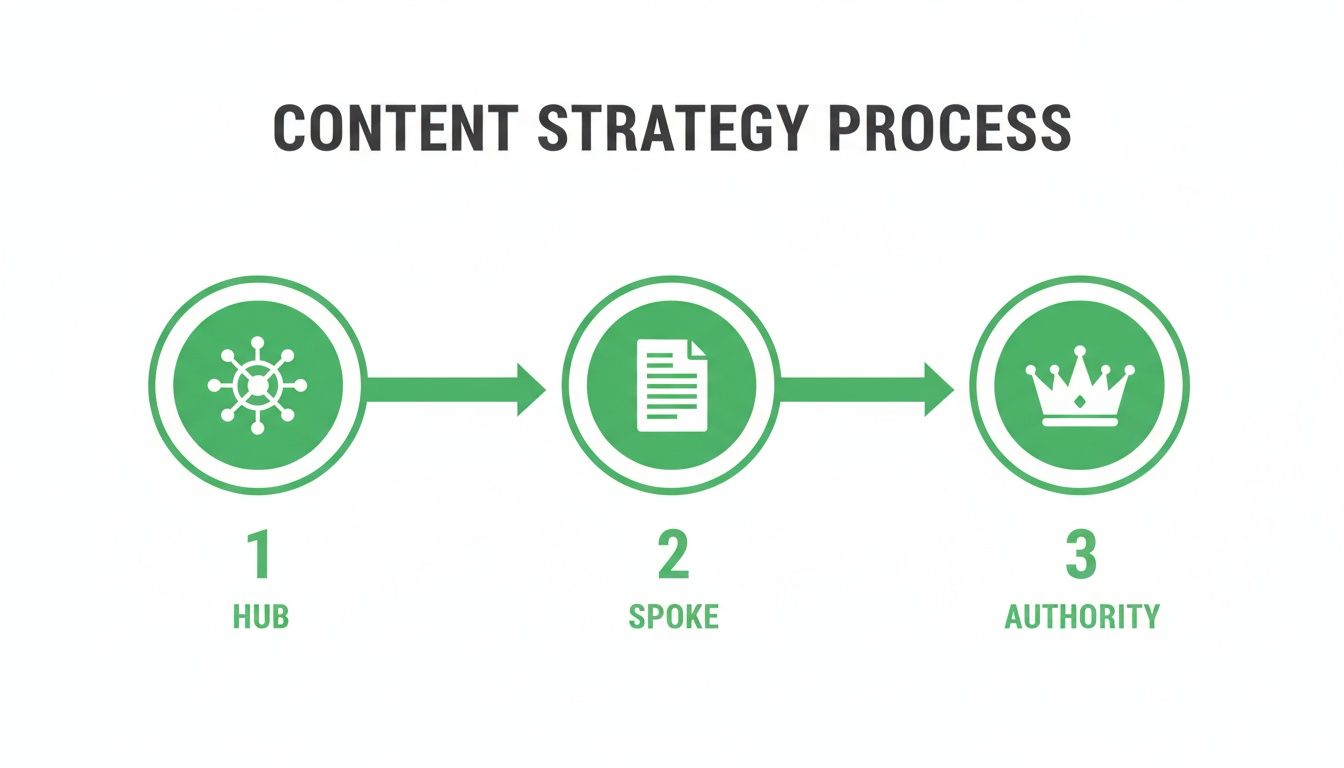
This visual shows how building authority with hub and spoke articles creates the perfect foundation for a successful pSEO project.
Your First Programmatic SEO Project: A 3-Step Plan
Ready to try it? Here’s a simple, non-technical framework to launch your first project.
1. Find Your Data in a Spreadsheet
Every pSEO project starts with a simple list. You can use Google Sheets or Airtable. This is the list of variables that will make each page unique.
- For a service business: Create columns for
Service Name,City, andNeighborhood. - For a review site: Create columns for
Product Name,Feature, andUse Case. - For a recipe blog: Create columns for
Dish Name,Cuisine, andDietary Type(e.g., vegan, gluten-free).
The goal is to find a repeatable pattern for keywords, like "[Service] in [City]" or "best [Product] for [Use Case]".
2. Design a High-Quality Page Template
Next, design your master page in your blog's editor (like WordPress or Webflow). This is the blueprint. It should include high-quality text, images, and calls-to-action that are relevant for all the pages you'll create.
Leave placeholders where your spreadsheet data will go. For example: "The 5 Benefits of {{Service Name}} for Residents of {{City}}."
3. Use AI and Automation to Connect Everything
This is where the magic happens. You use an automation tool like Zapier to connect your spreadsheet to your blog.
Here’s the simple workflow:
- Trigger: Set up Zapier to watch for a "New Row" in your Google Sheet or Airtable.
- Action 1 (AI Content): Connect to an AI tool (like OpenAI). Send the data from the new row (e.g., "Dog Grooming" and "Golden Retriever") to the AI with a prompt like: "Write a 150-word introduction about the specific grooming needs of a {{Breed}}."
- Action 2 (Publish): Take the original template content and the new AI-generated intro and tell Zapier to "Create a New Blog Post" in WordPress. The placeholders in your template are filled with the data from your spreadsheet and the new text from the AI.
For a deeper dive into how AI generates this text, you can learn about Natural Language Generation.
This approach amplifies your blogging and SEO efforts in a way manual work can't match. In Germany, for example, there are 78.9 million internet users. pSEO allows you to capture the thousands of specific, niche searches happening within that massive audience. You can discover more insights about Germany's digital landscape on datareportal.com.
By automating the creation of these hyper-relevant pages, you answer thousands of specific user questions and turn your blog into an organic traffic powerhouse.
The Modern Toolkit for Efficient Content Creation
A brilliant strategy is only as good as its execution. Having a plan for blogging and SEO is one thing, but having the right tools and workflows to actually bring it to life is something else entirely. This is where you build the operational engine that turns ideas into high-ranking content, time and time again.
The goal isn't to get bogged down with dozens of subscriptions. It's about putting together a lean, mean "stack" that covers the entire content lifecycle—from initial research to final publication—without overcomplicating things.
Curating Your Essential Tool Stack
Modern content creation really hinges on a few key types of software. You don’t need the priciest option in every category, but covering these bases gives your team the firepower it needs to compete.
Your core toolkit should handle:
- Keyword Research and SEO Analysis: This is non-negotiable. Tools like Ahrefs or SEMrush are the industry standard for a reason. They help you figure out what your audience is actually searching for, spy on competitors, and track how you're ranking.
- Content Optimisation: Once you've got a keyword, you need to make sure your content is built to rank for it. This is where tools like SurferSEO or MarketMuse come in. They analyse the top-ranking pages and give you live feedback on things like word count, headings, and related terms you should probably include.
- Programmatic SEO Execution: When you're ready to scale, you'll need tools to manage your data and templates. A simple setup using Airtable for your dataset and Whalesync or Zapier for automation can power your first pSEO project without writing a single line of code.
These tools form the technical backbone of an efficient content operation, helping you make smart, data-driven decisions at every step.
Building a Streamlined Editorial Workflow
Beyond the software, your most valuable asset is a crystal-clear, repeatable process. A solid editorial workflow gets rid of bottlenecks, keeps quality high, and makes scaling feel manageable instead of chaotic. Think of it as the assembly line for your content.
A great workflow ensures that every piece of content, whether it's a single blog post or one of a thousand programmatic pages, meets the same high standard for SEO and user value before it ever goes live.
You can break this process down into a few simple, sequential steps that take a piece of content from a rough idea to a published, optimised article.
From Idea to Published Post
Here’s a dead-simple, four-step workflow you can start using today to improve consistency and quality. This system works just as well for manual content as it does for AI-assisted writing, keeping everyone on the same page.
- The Content Brief: Every single article starts with a detailed brief. This document is your single source of truth, outlining the target keyword, search intent, required headings, internal linking opportunities, and key points to cover.
- Drafting and AI-Assisted Writing: With a solid brief in hand, the writing part gets a lot faster. Feel free to use AI to generate a first draft, but always have a human editor come in to refine it, add unique insights, and double-check everything for accuracy. We've got some great tips on this in our guide to creating an effective AI page content generation prompt.
- The Pre-Publish SEO Checklist: Before you even think about hitting "publish," run every post through a final SEO checklist. This means checking the title tag, meta description, image alt text, internal links, and the overall structure to make sure no stone was left unturned.
- Simple Content Promotion: Publishing isn't the last step. Have a basic promotion plan ready to go. This could be as simple as sharing the article on social media, sending it to your email list, or repurposing a few key takeaways for other platforms.
Measuring the Metrics That Actually Matter
Creating great content is only half the battle. If you don't know whether your hard work is actually paying off, you're flying blind. It's time to move beyond vanity metrics like page views and focus on the Key Performance Indicators (KPIs) that connect your blogging and SEO efforts to real business growth.
The goal isn't to drown in data. It's to build a simple, clear picture of what's working and what isn't. The good news is that free tools like Google Analytics 4 and Google Search Console give you everything you need to track the metrics that truly drive your business forward.
Core KPIs for Your SEO Dashboard
Instead of obsessing over dozens of data points, just focus on a handful of powerful metrics. These KPIs tell the real story of whether you're attracting the right audience, improving your visibility, and actually generating results.
- Organic Traffic: This one's simple—it's the number of visitors landing on your blog from search engines. A steady increase here is the most basic sign your SEO strategy is working.
- Keyword Ranking Improvements: Are you climbing the search results for the keywords you care about? Tracking your rank for key terms shows your content is gaining the authority and relevance it needs.
- Conversions: This is it. The most important metric of them all. A conversion is any valuable action a user takes, like signing up for a newsletter, downloading an e-book, or making a purchase. This is the KPI that proves the ROI of your content.
By focusing on conversions, you shift from simply attracting an audience to attracting the right audience—the one that takes meaningful action. This is how a blog becomes a powerful business asset.
Using Google's Free Tools
You don't need to shell out for expensive software to get started. Google provides two incredibly powerful, and completely free, platforms that are essential for measuring your blogging and SEO success.
Google Search Console (GSC) is your direct line of communication with Google. It's where you see which keywords are bringing people to your site and what your average ranking position is for those terms. It's the best place to monitor your organic visibility and spot any technical hiccups. You can learn more about how to interpret the numbers with our detailed guide to understanding Search Console metrics.
Google Analytics 4 (GA4) tells you what happens after someone lands on your site. Here you can track which blog posts are the most popular, see how long people are sticking around, and, most importantly, set up goals to measure conversions. By connecting GA4 and GSC, you get a full view of the user journey—from the initial search query all the way to conversion. That's how you get the insights needed to really refine your content strategy.
Got Questions? We've Got Answers.
Here are a few quick answers to the questions that pop up most often when people start mixing blogging with SEO. Think of this as your go-to reference to clear up any confusion and get you moving.
How Long Does It Take for a New Blog to Rank on Google?
This is the big question, and the honest answer is: it takes patience. A brand-new blog that’s consistently putting out genuinely helpful, well-optimised content can start seeing some movement for less competitive keywords within 3 to 6 months.
But for the really tough, high-value terms? You could easily be looking at a year or more to make a serious dent. It all comes down to the competitiveness of your niche, how good and how frequent your content is, your ability to attract backlinks, and whether your site is technically sound.
What Is the Difference Between SEO and Programmatic SEO?
Let's use an analogy. Traditional SEO is like being a master carpenter, meticulously handcrafting one beautiful piece of furniture at a time. You'd write a single blog post and optimise it for one main keyword. It's a focused, manual, and deeply creative process.
Programmatic SEO (pSEO), on the other hand, is like setting up an automated, intelligent workshop. Instead of building just one chair, you design a brilliant template and then use a dataset (like a list of cities, job titles, or product features) to automatically produce hundreds of unique, high-quality chairs. It takes the carpenter's craft and scales it up.
For example, instead of writing one page on "best CRM software," pSEO allows you to instantly generate targeted pages for "best CRM software for small business," "best CRM for real estate," and "best CRM for e-commerce" from a single system.
Can I Use AI to Write My Blog Posts for SEO?
Yes, but—and this is a big but—you need a human at the helm. Just firing up an AI tool and hitting "publish" is a surefire way to produce bland, generic content that Google (and your readers) will likely ignore. The secret is to use AI as a ridiculously smart assistant, not a replacement for your own expertise.
A workflow that actually works looks more like this:
- AI for Speed: Use AI to kickstart the process. Get it to help with brainstorming ideas, generating detailed outlines, or even knocking out a rough first draft.
- Human for Quality: This is where you come in. An expert needs to edit the AI's output, check it for accuracy, weave in unique insights and real-world examples, and make sure the final piece is genuinely valuable.
This "human-in-the-loop" approach gives you the best of both worlds: the raw efficiency of AI combined with the authority and nuance that only a real expert can provide. That’s the sweet spot for modern SEO.
Ready to stop writing one-off articles and start building a true content engine? At Programmatic SEO Hub, we give you the templates, systems, and practical guides to master programmatic SEO and scale your growth. Explore our free resources and toolkits today.
Related Articles
Mobile friendly test google: A Practical Guide to Master Mobile SEO
Even though Google’s standalone Mobile-Friendly Test tool is a thing of the past, the principle behind it is more critical than ever. The simple truth is that Google now overwhelmingly uses its...
A Practical Guide to Competitive Analysis Keywords
When we talk about competitive analysis keywords, we're really talking about the search terms that are already making money for your rivals. By digging into these, you uncover their entire...
Landing Pages SEO A Practical Guide to Rank and Convert
When we talk about SEO for landing pages, we're not just talking about general website optimisation. We're getting hyper-specific. This is the art of building and refining standalone pages...